`
| |
|
Archive for the ‘Tools’ Category
Wednesday, October 9th, 2013
Its pretty common in webapps to use Crontab to check for certain thresholds at regular intervals and send notifications if the threshold is crossed. Typically I would expose a secret URL and use WGet to invoke that URL via a cron.
The following cron will invoke the secret_url every hour.
0 */1 * * * /usr/bin/wget "http://nareshjain.com/cron/secret_url" |
0 */1 * * * /usr/bin/wget "http://nareshjain.com/cron/secret_url" Since this is running as a cron, we don’t want any output. So we can add the -q and –spider command line parameters. Like:
0 */1 * * * /usr/bin/wget -q --spider "http://nareshjain.com/cron/secret_url" |
0 */1 * * * /usr/bin/wget -q --spider "http://nareshjain.com/cron/secret_url" –spider command line parameter is very handy, it is used for a Dry-run .i.e. check if the URL actually exits. This way you don’t need to do things like:
wget -q "http://nareshjain.com/cron/secret_url" -O /dev/null |
wget -q "http://nareshjain.com/cron/secret_url" -O /dev/null But when you run this command from your terminal:
wget -q --spider "http://nareshjain.com/cron/secret_url"
Spider mode enabled. Check if remote file exists.
--2013-10-09 09:05:25--  http://nareshjain.com/cron/secret_url
Resolving nareshjain.com... 223.228.28.190
Connecting to nareshjain.com|223.228.28.190|:80... connected.
HTTP request sent, awaiting response... 404 Not Found
Remote file does not exist -- broken link!!! |
wget -q --spider "http://nareshjain.com/cron/secret_url"
Spider mode enabled. Check if remote file exists.
--2013-10-09 09:05:25-- http://nareshjain.com/cron/secret_url
Resolving nareshjain.com... 223.228.28.190
Connecting to nareshjain.com|223.228.28.190|:80... connected.
HTTP request sent, awaiting response... 404 Not Found
Remote file does not exist -- broken link!!! You use the same URL in your browser and sure enough, it actually works. Why is it not working via WGet then?
The catch is, –spider sends a HEAD HTTP request instead of a GET request.
You can check your access log:
my.ip.add.ress - - [09/Oct/2013:02:46:35 +0000] "HEAD /cron/secret_url HTTP/1.0" 404 0 "-" "Wget/1.11.4" |
my.ip.add.ress - - [09/Oct/2013:02:46:35 +0000] "HEAD /cron/secret_url HTTP/1.0" 404 0 "-" "Wget/1.11.4" If your secret URL is pointing to an actual file (like secret.php) then it does not matter, you should not see any error. However, if you are using any framework for specifying your routes, then you need to make sure you have a handler for HEAD request instead of GET.
Posted in Hosting, HTTP, Tips, Tools | No Comments »
Tuesday, June 18th, 2013
Recently I wanted to create a video demo of my iPad apps. So I thought, I would just walk-through the apps and capture the screen on my iPad. It turns out that its not as simple as I thought it would be. While the desktops have a ton of screen-casting software, iPad simply lacks any of these sophisticated software.
When I googled for screen-casting apps on iPhone/iPad, I found a huge number of apps, but all of them are mostly whiteboard apps, that let’s you capture the screen inside their app (more useful for teachers.)
Searching some more, helped me find a few viable options:
- Create a Screencast Video using Screenshot Images – Extremely painful. I’ve done this approach in the past. I would take these images, add it to a Keynote presentation, add a few animations/transition effects and then export the presentation as a video.
- Use an iOS Simulator with a Desktop Screen-capture tool – The most widely used and probably the first approach to creating demos was using the iPhone/iPad simulator on your Mac, while recording your Mac screen with QuickTime. Sound Stage looks like a cool app for recording your screen and adding some nice mojo to it.
- Use Display Recorder Utility to Capture on screen activity on your iPhone /iPad Screen – This app was removed from the app store, so the only way you can get this app is to install it via Cydia, which requires your device to be jail-broken.
- Use a Video Capture Card – Using a HDMI Adapter, connect the output of your iOS device to a video capture card.
- Use camera mounts for usability testing of mobile devices – This approach is great for usibility testing where you want to see the hand-gestures and facial expression of the user, but in our case this might be an overkill. BTW I really like Mr. Tappy, a kit for filming mobile devices. Originally designed as a filming rig for iPad usability testing, Mr Tappy lets you capture or share user interaction with mobile devices during user experience research, product demonstrations or classroom presentations.
- Mirror the iPhone/iPad screen via AirPlay and record it – This seemed like the easiest option for me. There are a couple of apps (Reflector, AirServer) available, which you need to install on your desktop. Once installed, you can go to your iOS device and start mirroring the screen on to your desktop. Not only does it mirror the screen, but it also uses the desktop to actually play the sound. And all of this over a wireless network. Once the iOS device’s screen is on your desktop, you can use QuickTime to easily capture the video.
Once I recorded by screen-cast using AirServer and QuickTime, then I used iMovie to do some minor editing and adding some annotations to the video. That’s it. I recorded the following 2 videos if you want to have a look.
Posted in Abacus, EdventureLabs, iPad App, iPhone, Marketing, Product Development, Tools | No Comments »
Thursday, April 4th, 2013
Over the last few months, multiple friends and connection from US have asked me to share my experience with pricing Agile related tools and services in Asia (specifically India.) Following is my perspective:
Disclaimer: Asia is the most diverse and dynamic continent out there. Any reasonable generalization is bound to have loopholes. Take it with a pinch of salt.
Since the topic on hand is pricing & positioning agile related services and tools, let’s focus on senior managers at software companies, who are interested & responsible for procuring (or at least recommending) a service or a tool for use inside their company. These folks mostly belonging to upper-middle class or above. Its important to focus on these folks because we can draw the following behavioral patterns based on their profile:
- 1. They are very value-for-money conscious. .i.e. while they are very price conscious these days they are also getting quite brand conscious. Feature-richness or “fully-loaded” appeals to them because they associate it with value-for-money.
- 2. Premium pricing model works well with them. .i.e. price the product or service artificially high in order to encourage favorable perceptions among buyers. Exploits the tendency in buyers to assume that expensive items enjoy
- an exceptional reputation,
- are more reliable or desirable,
- represent exceptional quality and distinction
- 3. If they can’t bargain the price while buying, they feel they did not get a good deal.
- 4. In my experience, Freemium model generally does not work very well. People will somehow find a way to stay on the free plan. Software Piracy is still a notable problem. Things like sharing a license with others is considered wrong, but people will still go ahead and indulge in it. May be because they don’t fully think through the implications or can’t empathize with IP related regulations.
- 5. Price Discrimination strategy appeals to these folks. .i.e. pricing the product differently for different companies. Bigger discount for larger number of licenses is common. But doing something more like: bigger discounts for startups or discounts for specific verticals like Telecom can attract customers.
Based on my experience consulting and coaching IT companies in India, I would categorize Indian IT companies, who are interested in Agile, into the following 5 categories:
- 1. Large Outsourced Services Organization (InfoSys, Wipro, TCS, CTS, HCL, MindTree, TechM, etc.)
- 2. Large ODC (Off-shore development centers) for giant software product companies (Google, Yahoo, Amazon, Microsoft, Intel, McAfee, EMC, Philips, Dell, GE, Siemens, VMWare, Alcatel Lucent, Ericsson, Aricent, Huawei, etc.)
- 3. Large ODC for large non-software product/services companies (Banks and Financial Institutes [JP Morgan, Citi, RBS, Fidelity], Store Chains [Tesco, Walmart, Target], Transportation [Volvo, John Deere], etc.)
- 4. Mid-size product and services companies (Directi, SlideShare, ClearTrip, Cactus Global, etc.)
- 5. Startups (Eko, Interview Street, CommonFloor, HelpShift, OlaCabs, Olx, Zomato, etc.)
Category 1 is highly obsessed with process adherence & compliance. Typically they have an internal process & tool which all projects have to use. In addition, clients of most projects might have a different process & tool required. Teams end up using both. Most teams use different tools because there are concerns regarding how much transparency is healthy for an outsource client-vendor relation. They want only limited data to be shared with the clients. In fact in my experience, to ensure company-wide consistency and compliance, most companies even have their own home grown tool/solution to deal with this issue. If majority of customers are using a process/tool, its an easy pitch to the companies to use the same approach, provided there is an easy way to share limited info with clients. Using same process/tool could add to the company’s marketing/credibility pitch. These companies are price conscious, but if the value proposition (better customer acquisition) is shown, they have the budgets to buy the tool or service. Might require multiple rounds of negotiation. They are willing to commit higher numbers if bigger discounts can be offered. Fairly long sales process.
Category 2 is fairly process conscious, but certainly to a lesser extent compared to Category 1. For these companies majority of the process and tool decisions are made by their counter-parts from west. They do have a say, but are not going to make the buying decision. However they can sabotage the process/tool decision if it does not work for them. Because of the “distributed & off-shore” nature of work, their needs might be different from the folks making the decision. These guys appreciate higher attention/care to their specific needs. Sales process tends to be much faster than Category 1.
Category 3 is also very process conscious. They are predominantly cost centers. Any tool or process which can show clear cost saving, better accountability & tracking is a big hit. Buying decisions are jointly made, however offshore folks do have a big say. Typically these folks require quite a lot of customization to the service or tool to fit their specific needs. Sales process tends to be very long.
Category 4 is out of the startup mode, and are the “wanna-be-enterprise” scale. These are in my opinion the best companies to chase for process change and tool adoption. They have the right attitude to change. Typically they also have the cash and they generally don’t bargain much. They have a strong desire to scale and standardize. Perfect pitch for a Industry Leading Tool to come in and steal the deal. Again these guys don’t tend to bargain too much, but if you give them a discount it will help make the decision faster because they are still price conscious. These guys will do a very detailed market study & competitor analysis. If possible, they prefer to pick the best in category. Sales process tends to be either couple of days or 6+ months (extremes.)
Category 5 is the least process conscious. However are very efficiency & savings driven. They won’t even talk to you if they feel the product is priced and targeted at Enterprises. They would assume/feel the product is expensive and too heavy-weight for startups. A clear pitch for startups in your offerings is very important. These folks will hunt you down. Again very price conscious, but can be good brand ambassadors. Sales process does take some time.
Hope this helps. Also would be keen to hear your experience.
Posted in Agile, agile india, Marketing, Product Development, Tools | 2 Comments »
Saturday, January 5th, 2013
Posted in Agile, Design, Tips, Tools | 1 Comment »
Sunday, December 30th, 2012
Create the following AppleScript using the AppleScript Editor
on run argv
  set the this_file to item 1 of argv
  set the vertical_crop to 20
  set the horizontal_crop to 30
  tell application "Image Events"
    launch
    set this_image to open this_file
    copy dimensions of this_image to {W, H}
    crop this_image to dimensions {W - horizontal_crop, H - vertical_crop}
    save this_image with icon
    close this_image
  end tell
end run |
on run argv
set the this_file to item 1 of argv
set the vertical_crop to 20
set the horizontal_crop to 30
tell application "Image Events"
launch
set this_image to open this_file
copy dimensions of this_image to {W, H}
crop this_image to dimensions {W - horizontal_crop, H - vertical_crop}
save this_image with icon
close this_image
end tell
end run Compile and save the file as a script.
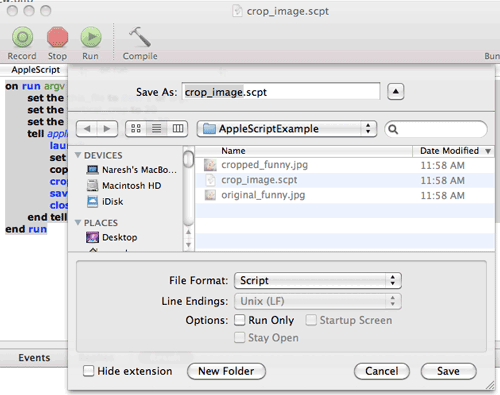
Now you are ready to run the script on your images:
naresh$ osascript crop_image.scpt /complete/path/to/image.ext |
naresh$ osascript crop_image.scpt /complete/path/to/image.ext Results:
| Before |
After |
 |
 |
Posted in Hacking, Tools | No Comments »
Tuesday, November 1st, 2011
“Release Early, Release Often” is a proven mantra, but what happens when you push this practice to it’s limits? .i.e. deploying latest code changes to the production servers every time a developer checks-in code?
At Industrial Logic, developers are deploying code dozens of times a day, rapidly responding to their customers and reducing their “code inventory”.
This talk will demonstrate our approach, deployment architecture, tools and culture needed for CD and how at Industrial Logic, we gradually got there.
Process/Mechanics
This will be a 60 mins interactive talk with a demo. Also has a small group activity as an icebreaker.
Key takeaway: When we started about 2 years ago, it felt like it was a huge step to achieve CD. Almost a all or nothing. Over the next 6 months we were able to break down the problem and achieve CD in baby steps. I think that approach we took to CD is a key take away from this session.
Talk Outline
- Context Setting: Need for Continuous Integration (3 mins)
- Next steps to CI (2 mins)
- Intro to Continuous Deployment (5 mins)
- Demo of CD at Freeset (for Content Delivery on Web) (10 mins) – a quick, live walk thru of how the deployment and servers are set up
- Benefits of CD (5 mins)
- Demo of CD for Industrial Logic’s eLearning (15 mins) – a detailed walk thru of our evolution and live demo of the steps that take place during our CD process
- Zero Downtime deployment (10 mins)
- CD’s Impact on Team Culture (5 mins)
- Q&A (5 mins)
Target Audience
- CTO
- Architect
- Tech Lead
- Developers
- Operations
Context
Industrial Logic’s eLearning context? number of changes, developers, customers , etc…?
Industrial Logic’s eLearning has rich multi-media interactive content delivered over the web. Our eLearning modules (called Albums) has pictures & text, videos, quizes, programming exercises (labs) in 5 different programming languages, packing system to validate & produce the labs, plugins for different IDEs on different platforms to record programming sessions, analysis engine to score student’s lab work in different languages, commenting system, reporting system to generate different kind of student reports, etc.
We have 2 kinds of changes, eLearning platform changes (requires updating code or configuration) or content changes (either code or any other multi-media changes.) This is managed by 5 distributed contributors.
On an average we’ve seen about 12 check-ins per day.
Our customers are developers, managers and L&D teams from companies like Google, GE Energy, HP, EMC, Philips, and many other fortune 100 companies. Our customers have very high expectations from our side. We have to demonstrate what we preach.
Learning outcomes
- General Architectural considerations for CD
- Tools and Cultural change required to embrace CD
- How to achieve Zero-downtime deploys (including databases)
- How to slice work (stories) such that something is deployable and usable very early on
- How to build different visibility levels such that new/experimental features are only visible to subset of users
- What Delivery tests do
- You should walk away with some good ideas of how your company can practice CD
Slides from Previous Talks
Posted in Agile, Continuous Deployment, Deployment, Lean Startup, Product Development, Testing, Tools | No Comments »
Sunday, October 9th, 2011
We have a few Red Hat Enterprise Linux servers, all run ConfigServer and Security (CSF), which is a Stateful Packet Inspection (SPI) firewall, Login/Intrusion Detection and Security application for Linux servers. Amongst various other things, it looks for port scans, multiple login failures and other things that it thinks are ominous, and locks out the originating IP address by rewriting the iptables firewall rules.
For example, if you try to connect to the same server via http, https, ssh and svn within some short window of time, you are quite likely to incur its wrath. Developers at Industrial Logic often lock themselves out by getting blacklisted.
Generally when this happens, we ssh into one of our other server, connect to the server that has blacklisted us, and execute the following command to see what is going on:
$ sudo /usr/sbin/csf -t
| A/D |
IP address |
Port |
Dir |
Time To Live |
Comment |
| DENY |
117.193.150.62 |
* |
in |
9m 58s |
lfd – *Port Scan* detected from 117.193.150.62 (IN/India/-). 11 hits in the last 36 seconds |
As you can see, csf blacklisted my IP for port scanning.
If your IP is the only record, you can flush the whole temporary block list by executing:
$ sudo /usr/sbin/csf -tf
DROP all opt — in !lo out * 117.193.150.62 -> 0.0.0.0/0
csf: 117.193.150.62 temporary block removed
csf: There are no temporary IP allows
Alternatively you can execute the following command to just remove a specific IP:
$ sudo /usr/sbin/csf -tr
The easiest way to find your (external) IP address is to visit http://www.whatsmyip.org/
If you have a static IP, then you can whitelist yourself by:
$ sudo /usr/sbin/csf -a
Posted in Deployment, Hosting, Linux, Tools | 1 Comment »
Friday, October 7th, 2011
Today I was adding some new users to our Hudson CI Server. Since we use Husdon’s Own User Database, I had to add new users in Hudson. However after that, when the new user tried to login, the user kept getting the following error:
Access denied User is missing the Read permission.
Google did not reveal any thing obvious. Then I started looking at Hudson configuration and realized that we’re using Hudson’s Matrix-based security authorization.
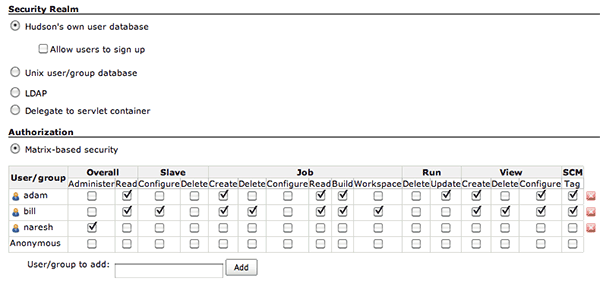
So every time we add a new user, we have to add the same user here as well. What a pain! Ideally permissions should be a link right from the new user’s page.
I wish we stop using the Martix-based security authorization and instead just use “Anyone can do anything” option. One less administrative step.
Posted in Continuous Deployment, Tools, UX | No Comments »
Tuesday, June 21st, 2011
Industrial Logic’s eLearning has a feature where students can upload their programming exercise and get automated, personalized feedback. We do various server-side analysis (automated critique) of the student’s code to score them and to give them feedback about how well they performed in their programming exercises. To do this we need to compile their code on our server.
Recently we upgraded our .Net Compiler from version 2.0 to version 3.5. In version 2.0 we had to provide a reference to System.dll file (located in c:\WINDOWS\Microsoft.NET\Framework\v2.0.50727\System.dll) for compiling. In version 3.5, they don’t have System.dll file. It was replaced by System.core.dll (located in c:\Program Files\Reference Assemblies\Microsoft\Framework\v3.5\System.Core.dll)
After making this change, when we ran the compiler using c:\WINDOWS\Microsoft.NET\Framework\v3.5\Csc.exe we got the following error:
Microsoft (R) Visual C# 2008 Compiler version 3.5.30729.1
for Microsoft (R) .NET Framework version 3.5
Copyright (C) Microsoft Corporation. All rights reserved.
SomeCSharpClass.cs: error CS0234: The type or namespace name ‘Specialized’ does not exist in the namespace ‘System.Collections’ (are you missing an assembly reference?)
It turns out that ‘System.collections.specialized’ namespace used to exist in System.dll in .net 2.0. In 3.5 System.Core.dll (which replaced the System.dll) does not contain it. Hence the compile time error.
We’ve fixed this issue by adding both System.Core.dll (v3.5) and System.dll (v2.0) to the compiler reference path. Not sure if this is the right thing to do. But it seems to work.
Posted in Deployment, Programming, Tools | 1 Comment »
Friday, June 3rd, 2011
As an Eclipse user, who still works with CVS for some projects, when I check-out a repository through Eclipse, I have the choice between
- extssh method: Enter the password only once,
- ext method: Enter the password at every operation, several times.
‘extssh’ is the obvious choice. And life is good, until you need to use the command line CVS client.
The latest version of CVS 1.12.13 from ftp.gnu.org does not support extssh method.
If you run a CVS command from the command-line on a project created by Eclipse, it gives the following error message:
$cvs log
cvs log: Unknown method (`extssh’) in CVSROOT.
cvs log: in directory .:
cvs log: ignoring CVS/Root because it does not contain a valid root.
cvs log: No CVSROOT specified! Please use the `-d’ option
cvs [log aborted]: or set the CVSROOT environment variable.
Unfortunately even after having reported this issue several years ago, the official cvs program does not support this method.
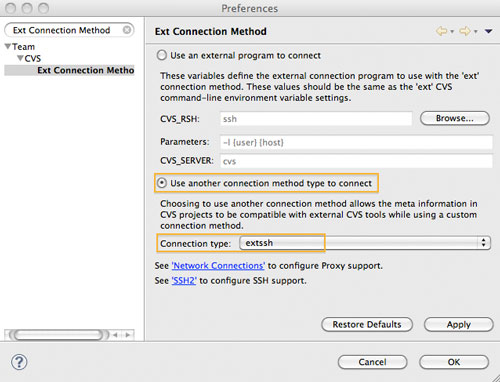
Luckily Eclipse offers an improved interoperability. You can specify ‘ext’ method while checking out the repository. Then via
Eclipse > Preferences > Team > CVS > Ext Connection Method
Select ‘Use another connection method type to connect’ and specify ‘Connection Type’ as ‘extssh’
If you had already created a project using extssh, don’t worry. You can always go the CVS Perspective > Select your repository > right click > Properties > change the connection type back to ext.
It will take a while for Eclipse to update the meta files on the disk. Once its done, you should be able to execute cvs commands from both Eclipse and the command line client.
Posted in Programming, Tools | No Comments »
|