`
| |
|
Archive for the ‘Programming’ Category
Thursday, June 7th, 2012
Unfortunately many developers think they already know enough values and principles, so its not worth spending anytime learning or practicing them. Instead they want to learn the holy grail of software design – “the design patterns.”
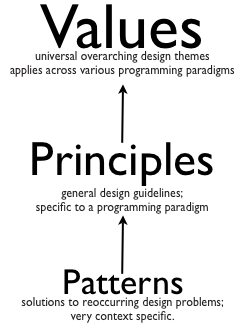
While the developers might think, design patterns is the ultimate nirvana of designing, I would say, they really need to learn how to think in their paradigm plus internalize the values and principles first. I would suggest developers should focus on the basics for at least 6 months before going near patterns. Else they would gain a very superficial knowledge about the patterns, and won’t be able to appreciate its true value or applicability.
Any time I get a request for teaching OO design patterns, I insist that we start the workshop with a recap of the values and principles. Time and again, I find developers in the class agreeing that they are having a hard time thinking in Objects. Most developers are still very much programming in the procedural way. Trying to retrofit objects, but not really thinking in-terms of objects and responsibilities.
Recently a student in my class shared that:
I thought we were doing Object Oriented Programming, but clearly its a paradigm shift that we still need to make.
On the first day, I start the class with simple labs, in the first 4-5 labs, you can see the developers struggle to come up with a simple object-oriented solution for basic design problems. They end up with a very procedural solution:
- main class with a bunch of static methods or
- data holder classes with public accessors and other or/er classes pulling that data to do some logic.
- very heavy use of if-else or switch
Its sad that teams don’t understand nor give importance to the following important OO concepts:
- Data and Logic together – Encapsulation (Everyone knows the definition of encapsulation, but how to put it in proper use, is always a big question mark.) Many developers write public Getters/Setters or Accessors by default on their classes. And are shocked to realize that it breaks encapsulation.
- Inheritance is the last option: It is quite common to see solutions where slight variation in data is modeled as a hierarchy of classes. The child classes have no behavior in them and often leads to a class explosion.
- Composition over Inheritance – In various labs, developers go down the route of using Inheritance to reuse behavior instead of thinking of a composition based design. Sadly, inheritance based solutions have various flaws that the team can’t realize, until highlighted. Coming up with a good inheritance based design, when the parent is mutable, it extremely tricky.
- Focus on smart data-structure: The developers have a tough time coming up with smart data-structure and putting logic around it. Via various labs, I try to demonstrate how designing smart data-structures can make their code extremely simple and minimalistic.
I’ve often noticed that, when you give developers a problem, they start off by drawing a flow chart, data-flow diagram or some other diagram which naturally lends them into a procedural design.
Thinking in terms of Objects requires thinking of objects and responsibilities, not so much in terms of flow. Its extremely important to understand the problem, distill it down to the crux by eliminating noise and then building a solution in an incremental fashion. Many developers have a misconception that a good designs has to be fully flushed out before you start. I’ve usually found that a good design emerges in an incremental fashion.
Even though many developers know the definition of high-cohesion, low-coupling and conceptual integrity, when asked to give a software or non-software example, they have a hard time. It goes to show that they don’t really understand the concept in action.
Developers might have read the bookish definition of the various Design Principles. But when asked to find out what design principles were violated in a sample design, they are not able to articulate. Also often you find a lot of misconception about the various principles. For example, Single Responsibility, few developers say that each method should do only one thing and a class should only have one responsibility. What does that actually mean? It turns out that SRP has to do more with temporal symmetry and change. Grouping behavior together from a change point of view.
Even though most developers raise their hands when asked if they know code smells, they have a tough time identifying them or avoiding them in their design. Developers need a lot of hands-on practice to recognize and avoid various code smells. Once you learn to recognize code smells, the next step is to learn how to effectively refactor away from them.
Often I find developers have the most expensive and jazzy tools & IDEs, but when you watch them code, they use their IDEs just as a text-editor. No automated refactoring. Most developers type “Public class xxx” instead of writing the caller code first and then using the IDE to generate the required skeleton code for them. Use of keyboard shortcuts is as rare as seeing solar eclipse. Pretty much most developers practice what I call mouse driven programming. In my experience, better use of IDE and Refactoring tools can give developers at least 5x productivity boost.
I hardly remember meeting a developer who said they don’t know how to unit test. Yet time and again, most developers in my class struggle to write good unit tests. Due to lack of familiarity or lack of practice or stupid misconceptions, most developers skip writing any automated unit tests. Instead they use Sysout/Console.out or other debugging mechanism to validate their logic. Getting better at their unit testing skills and then gradually TDD can really give them a productivity boost and improve their code quality.
I would be extremely happy if every development shop, invested 1 hour each week to organize a refactoring fest, design fest or a coding dojo for their developers to practice and hone their design skills. One can attend as many trainings as they want, but unless they deliberately practice and apply these techniques on job, it will not help.
Posted in Agile, Code Smells, Design, Programming, Training | 1 Comment »
Thursday, June 7th, 2012
Following Object Oriented Design Principles have really helped me designing my code:
Along with these principles, I’ve also learned a lot from the 17 rules explained in the Art of Unix Programming book:
- Rule of Modularity: Write simple parts connected by clean interfaces
- Rule of Clarity: Clarity is better than cleverness.
- Rule of Composition: Design programs to be connected to other programs.
- Rule of Separation: Separate policy from mechanism; separate interfaces from engines
- Rule of Simplicity: Design for simplicity; add complexity only where you must
- Rule of Parsimony: Write a big program only when it is clear by demonstration that nothing else will do
- Rule of Transparency: Design for visibility to make inspection and debugging easier
- Rule of Robustness: Robustness is the child of transparency and simplicity
- Rule of Representation: Fold knowledge into data so program logic can be stupid and robust
- Rule of Least Surprise: In interface design, always do the least surprising thing
- Rule of Silence: When a program has nothing surprising to say, it should say nothing
- Rule of Repair: When you must fail, fail noisily and as soon as possible
- Rule of Economy: Programmer time is expensive; conserve it in preference to machine time
- Rule of Generation: Avoid hand-hacking; write programs to write programs when you can
- Rule of Optimization: Prototype before polishing. Get it working before you optimize it
- Rule of Diversity: Distrust all claims for “one true way”
- Rule of Extensibility: Design for the future, because it will be here sooner than you think
Posted in Agile, Code Smells, Design, Programming | 1 Comment »
Monday, January 2nd, 2012
“Its God’s gift” or “S/he was born talented” or “S/He just lucky” is a common myth that undermines the relentless hard-work experts put to attain mastery in their respect work.
Benjamin Bloom, a pioneer who broke this myth found out that:
“All the superb performers, he investigated, had practiced intensively, had studied with devoted teachers, and had been supported enthusiastically by their families throughout their developing years.”
Later research, building on Bloom’s study revealed that the amount and quality of practice were key factors in the level of expertise people achieved.
Consistently and overwhelmingly, the evidence showed that:
“Experts are always made, not born.”
The journey to truly superior performance is neither for the faint hearted nor for the impatient. The development of genuine expertise requires struggle, sacrifice, and honest, often painful self-assessment. There are no shortcuts. It will take many years if not decades to achieve expertise, and you will need to invest that time wisely, by engaging in “deliberate” practice; practice that focuses on tasks beyond your current level of competence and comfort. You will need a well-informed coach not only to guide you through deliberate practice but also to help you learn how to coach yourself.
One study showed that psychotherapists with advanced degrees and decades of experience aren’t reliably more successful in their treatment of randomly assigned patients than novice therapists with just three months of training are. There are even examples of expertise seeming to decline with experience. The longer physicians have been out of training, for example, the less able they are to identify unusual diseases of the lungs or heart. Because they encounter these illnesses so rarely, doctors quickly forget their characteristic features and have difficulty diagnosing them.
Practice Deliberately: Not all practice makes you perfect. You need a particular kind of practice – “deliberate practice” – to develop expertise. When most people practice, they focus on the things they already know how to do. Deliberate practice is different. It entails considerable, specific, and sustained efforts to do something you can’t do well – or even at all.
Let’s imagine you are learning to play golf for the first time. In the early phases, you try to understand the basic strokes and focus on avoiding gross mistakes (like driving the ball into another player). You practice on the putting green, hit balls at a driving range, and play rounds with others who are most likely novices like you. In a surprisingly short time (perhaps 50 hours), you will develop better control and your game will improve. From then on, you will work on your skills by driving and putting more balls and engaging in more games, until your strokes become automatic: You’ll think less about each shot and play more from intuition. Your golf game now is a social outing, in which you occasionally concentrate on your shot. From this point on, additional time on the course will not substantially improve your performance, which may remain at the same level for decades.
Why does this happen?
You don’t improve because when you are playing a game, you get only a single chance to make a shot from any given location. You don’t get to figure out how you can correct mistakes. If you were allowed to take five to ten shots from the exact same location on the course, you would get more feedback on your technique and start to adjust your playing style to improve your control. In fact, professionals often take multiple shots from the same location when they train and when they check out a course before a tournament.
Computer gaming is an excellent example where I’ve seen people practice deliberately to get better. They focus on what they can do well, but they also focus on what they can’t do well. Most importantly, when practicing, the gamer is not just mindlessly playing. It’s a very thoughtful, deep, dedicated practice session.
War games serve a similar training function at military academies. So do flight simulators for pilots. Unfortunately in software development, very few people practice deliberately.
Genuine experts not only practice deliberately but also think deliberately. The golfer Ben Hogan once explained, “While I am practicing I am also trying to develop my powers of concentration. I never just walk up and hit the ball.”
Deliberate practice involves two kinds of learning:
- Improving the skills you already have
- Extending the reach and range of your skills.
“Practice puts brains in your muscles” – Golf champion Sam Snead
The enormous concentration required undertaking these twin tasks limits the amount of time you can spend doing them.
How long should you do deliberate practice each day?
“It really doesn’t matter how long. If you practice with your fingers, no amount is enough. If you practice with your head, two hours is plenty.”
It’s very easy to neglect deliberate practice. Experts who reach a high level of performance often find themselves responding automatically to specific situations and may come to rely exclusively on their intuition. This leads to difficulties when they deal with atypical or rare cases, because they’ve lost the ability to analyze a situation and work through the right response. Experts may not recognize this creeping intuition bias, of course, because there is no penalty until they encounter a situation in which a habitual response fails and maybe even causes damage.
Many research show the importance of a coach/mentor in deliberate practice. Some strongly favor an apprenticeship model. However one needs to be aware of the limitation of just following a coach or working alongside an “expert.”
Statistics show that radiologists correctly diagnose breast cancer from X-rays about 70% of the time. Typically, young radiologists learn the skill of interpreting X-rays by working alongside an “expert.” So it’s hardly surprising that the success rate has stuck at 70% for a long time. Imagine how much better radiology might get if radiologists practiced instead by making diagnostic judgments using X-rays in a library of old verified cases, where they could immediately determine their accuracy.
All an all, “Living in a cave does not make you a geologist” .i.e. without deliberate practice you go no where.
Original Article: The Making of an Expert
Posted in Coaching, Organizational, Programming, Self Help | 2 Comments »
Tuesday, November 1st, 2011
Recently we realized that our server logs were showing ‘null’ for all HTTP request parameters values.
SEVERE: Attempting to get user with null userName
parameters=[version:null][sessionId:null][userAgent:null][requestedUrl:null][queryString:null]
[action:null][session:null][userIPAddress:null][year:null][path:null][user:null] |
SEVERE: Attempting to get user with null userName
parameters=[version:null][sessionId:null][userAgent:null][requestedUrl:null][queryString:null]
[action:null][session:null][userIPAddress:null][year:null][path:null][user:null] On digging around a bit, we found the following buggy code in our custom Map class, which was used to hold the request parameters:
@Override
public String toString() {
    StringBuilder parameters = new StringBuilder();
    for (Map.Entry<String, Object> entry : entrySet())
        parameters.append("[")
                .append(entry.getKey())
                .append(":")
                .append(get(entry.getValue()))
                .append("]");
    return parameters.toString();
} |
@Override
public String toString() {
StringBuilder parameters = new StringBuilder();
for (Map.Entry<String, Object> entry : entrySet())
parameters.append("[")
.append(entry.getKey())
.append(":")
.append(get(entry.getValue()))
.append("]");
return parameters.toString();
} When we found this, many team members’ reaction was:
If the author had written unit tests, this bug would have been caught immediately.
Others responded saying:
But we usually don’t write tests for toString(), Getters and Setters. We pragmatically choose when to invest in unit tests.
As all of this was taking place, I was wondering, why in the first place, the author even wrote this code? As you can see from the following snippet, Maps already know how to print themselves.
@Test
public void mapKnowsHowToPrintItself() {
    Map hashMap = new HashMap();
    hashMap.put("Key1", "Value1");
    hashMap.put("Key2", "Value2");
    System.out.println(hashMap);
} |
@Test
public void mapKnowsHowToPrintItself() {
Map hashMap = new HashMap();
hashMap.put("Key1", "Value1");
hashMap.put("Key2", "Value2");
System.out.println(hashMap);
} Output: {Key2=Value2, Key1=Value1} |
Output: {Key2=Value2, Key1=Value1} Its easy to fall into the trap of first writing useless code and then defending it by writing more useless tests for it.
I’m a lazy developer and I always strive real hard to write as little code as possible. IMHO real power and simplicity comes from less code, not more.
Posted in Agile, Programming, Testing | No Comments »
Tuesday, November 1st, 2011
Every single line of code must be unit tested!
This sound advice rather seems quite extreme to me. IMHO a skilled programmer pragmatically decides when to invest in unit testing.
After practicing (automated) unit testing for over a decade, I’m a strong believer and proponent of automated unit testing. My take on why developers should care about Unit Testing and TDD.
However over the years I’ve realized that automated unit tests do have four, very important, costs associated with them:
- Cost of writing the unit tests in the first place
- Cost of running the unit tests regularly to get feedback
- Cost of maintaining and updating the unit tests as and when required
- Cost of understanding other’s unit tests
One also starts to recognize some other subtle costs associated with unit testing:
- Illusion of safety: While unit tests gives you a great safety net, at times, it can also create an illusion of safety leading to developers too heavily relying on just unit tests (possibly doing more harm than good.)
- Opportunity cost: If I did not invest in this test, what else could I have done in that time? Flip side of this argument is the opportunity cost of repetitive manually testing or even worse not testing at all.
- Getting in the way: While unit tests help you drive your design, at times, they do get in the way of refactoring. Many times, I’ve refrained from refactoring the code because I get intimidated by the sheer effort of refactor/rewrite a large number of my tests as well. (I’ve learned many patterns to reduce this pain over the years, but the pain still exists.)
- Obscures a simpler design: Many times, I find myself so engrossed in my tests and the design it leads to, that I become ignorant to a better, more simpler design. Also sometimes half-way through, even if I realize that there might be an alternative design, because I’ve already invested in a solution (plus all its tests), its harder to throw away the code. In retrospect this always seems like a bad choice.
If we consider all these factors, would you agree with me that:
Automated unit testing is extremely important, but each developer has to make a conscious, pragmatic decision when to invest in unit testing.
Its easy to say always write unit tests, but it takes years of first-hand experience to judge where to draw the line.
Posted in Agile, Design, Learning, Programming, Testing | 4 Comments »
Tuesday, November 1st, 2011
Why should developers care of automated unit tests?
- Keeps you out of the (time hungry) debugger!
- Reduces bugs in new features and in existing features
- Reduces the cost of change
- Improves design
- Encourages refactoring
- Builds a safety net to defend against other programmers
- Is fun
- Forces you to slow down and think
- Speeds up development by eliminating waste
- Reduces fear
And how TDD takes it to the next level?
- Improves productivity by
- minimizing time spent debugging
- reduces the need for manual (monkey) checking by developers and tester
- helping developers to maintain focus
- reduce wastage: hand overs
- Improves communication
- Creating living, up-to-date specification
- Communicate design decisions
- Learning: listen to your code
- Baby steps: slow down and think
- Improves confidence
- Testable code by design + safety net
- Loosely-coupled design
- Refactoring
Posted in Agile, Design, Programming, Testing | No Comments »
Sunday, October 9th, 2011
In Software, Quality is one of those badly abused term, which is getting harder and harder to define what it really means. I think we have a sense of quality. When we see something in a specific context, we can say its high quality or low quality, but its hard to define (and hence measure) what absolute quality really is.
You can measure somethings about quality, but don’t fool yourself to believe that IS quality.
Quality is subjective, relative and contextual.
Some might say things like code coverage, cyclomatic complexity and defect density is a good measure of quality. I would argue that those are attributes/aspects of quality, but not quality itself (symptoms not the disease itself.) Its a classic case of Fundamental Attribution Error. (If you go to France and see the first 50 Frenchmen wear glasses, you cannot conclude all Frenchmen wear glasses. Nor can you conclude that, if I wear glasses I’ll also be French.)
BTW people already differentiate between Internal/Intrinsic Quality and External/Extrinsic Quality. This is not enough to complicate things, evangelists would like to further slice and dice quality along different parameters (structural, functional, UX, etc.)
Some anecdotes:
Posted in Agile, Design, Metrics, Programming | No Comments »
Saturday, August 6th, 2011
Consider the following code to retrieve a user’s profile:
public bool GetUserProfile(string userName, out Profile userProfile, out string msg)
{
    msg = string.Empty;
    userProfile = null;
    if (some_validations_here))
    {
        msg = string.Format("Insufficient data to get Profile for username: {0}.", userName);
        return false;
    }

    IList<User> users = // retrieve from database

    if (users.Count() > 1)
    {
        msg = string.Format("Username {0} has {1} Profiles", userName, users.Count());
        return false;
    }

    if (users.Count() == 0)
    {
       userProfile = Profiles.Guest;
    }
    else
    {
        userProfile = users.Get(0).Profile;
    }
    return true;
} |
public bool GetUserProfile(string userName, out Profile userProfile, out string msg)
{
msg = string.Empty;
userProfile = null;
if (some_validations_here))
{
msg = string.Format("Insufficient data to get Profile for username: {0}.", userName);
return false;
}
IList<User> users = // retrieve from database
if (users.Count() > 1)
{
msg = string.Format("Username {0} has {1} Profiles", userName, users.Count());
return false;
}
if (users.Count() == 0)
{
userProfile = Profiles.Guest;
}
else
{
userProfile = users.Get(0).Profile;
}
return true;
} Notice the bool return value and the use of out parameters. This code is heavily influenced by COM & C Programming. We don’t operate under the same constraints these days.
If we were to write a test for this method, what would it look like?
[TestClass]
public class ProfileControllerTest
{
    private string msg;
    private Profile userProfile;
    //create a fakeDB
    private ProfileController controller = new ProfileController(fakeDB);
    private const string UserName = "Naresh.Jain";

    [TestMethod]
    public void ValidUserNameIsRequiredToGetProfile()
    {
        var emptyUserName = "";
        Assert.IsFalse(controller.GetUserProfile(emptyUserName, out userProfile, out msg));
        Assert.IsNull(userProfile);
        Assert.AreEqual("Insufficient data to get Profile for username: " + UserName + ".", msg);
    }

    [TestMethod]
    public void UsersCannotHaveMultipleProfiles()
    {
        //fake DB returns 2 records
        Assert.IsFalse(controller.GetUserProfile(UserName, out userProfile, out msg));
        Assert.IsNull(userProfile);
        Assert.AreEqual("Username "+ UserName +" has 2 Profiles.", msg);
    }

    [TestMethod]
    public void ProfileDefaultedToGuestWhenNoRecordsAreFound()
    {
        //fake DB does not return any records
        Assert.IsTrue(controller.GetUserProfile(UserName, out userProfile, out msg));
        Assert.AreEqual(Profiles.Guest, userProfile);
        Assert.IsNull(msg);
    }

    [TestMethod]
    public void MatchingProfileIsRetrievedForValidUserName()
    {
        //fake DB returns valid tester
        Assert.IsTrue(controller.GetUserProfile(UserName, out userProfile, out msg));
        Assert.AreEqual(Profiles.Tester, userProfile);
        Assert.IsNull(msg);
    }
} |
[TestClass]
public class ProfileControllerTest
{
private string msg;
private Profile userProfile;
//create a fakeDB
private ProfileController controller = new ProfileController(fakeDB);
private const string UserName = "Naresh.Jain";
[TestMethod]
public void ValidUserNameIsRequiredToGetProfile()
{
var emptyUserName = "";
Assert.IsFalse(controller.GetUserProfile(emptyUserName, out userProfile, out msg));
Assert.IsNull(userProfile);
Assert.AreEqual("Insufficient data to get Profile for username: " + UserName + ".", msg);
}
[TestMethod]
public void UsersCannotHaveMultipleProfiles()
{
//fake DB returns 2 records
Assert.IsFalse(controller.GetUserProfile(UserName, out userProfile, out msg));
Assert.IsNull(userProfile);
Assert.AreEqual("Username "+ UserName +" has 2 Profiles.", msg);
}
[TestMethod]
public void ProfileDefaultedToGuestWhenNoRecordsAreFound()
{
//fake DB does not return any records
Assert.IsTrue(controller.GetUserProfile(UserName, out userProfile, out msg));
Assert.AreEqual(Profiles.Guest, userProfile);
Assert.IsNull(msg);
}
[TestMethod]
public void MatchingProfileIsRetrievedForValidUserName()
{
//fake DB returns valid tester
Assert.IsTrue(controller.GetUserProfile(UserName, out userProfile, out msg));
Assert.AreEqual(Profiles.Tester, userProfile);
Assert.IsNull(msg);
}
} This code really stinks.
What problems do you see with this approach?
- Code like this lacks encapsulation. All the out parameters could be encapsulated into an object.
- Encourages duplication in both client code and inside this method.
- The caller of this method needs to check the return value first. If its false then they need to get the msg and do the needful. Its very easy to ignore the failure conditions. (In fact with this very code we saw that happen in 4 out of 6 places.)
- Tests have to validate multiple things to ensure the code is functions correctly.
- Overall more difficult to understand
We can refactor this code as follows:
public Profile GetUserProfile(string userName)
{
    if (some_validations_here))
        throw new Exception(string.Format("Insufficient data to get Profile for username: {0}.", userName));

    IList<User> users = // retrieve from database

    if (users.Count() > 1)
        throw new Exception(string.Format(""Username {0} has {1} Profiles", userName, users.Count()));

    if (users.Count() == 0) return Profiles.Guest;

    return users.Get(0).Profile;
} |
public Profile GetUserProfile(string userName)
{
if (some_validations_here))
throw new Exception(string.Format("Insufficient data to get Profile for username: {0}.", userName));
IList<User> users = // retrieve from database
if (users.Count() > 1)
throw new Exception(string.Format(""Username {0} has {1} Profiles", userName, users.Count()));
if (users.Count() == 0) return Profiles.Guest;
return users.Get(0).Profile;
} and Test code as:
[TestClass]
public class ProfileControllerTest
{
    //create a fakeDB
    private ProfileController controller = new ProfileController(fakeDB);
    private const string UserName = "Naresh.Jain";

    [TestMethod]
    [ExpectedException(typeof(Exception), "Insufficient data to get Profile for username: .")]
    public void ValidUserNameIsRequiredToGetProfile()
    {
        var emptyUserName = "";
        controller.GetUserProfile(emptyUserName);
    }

    [TestMethod]
    [ExpectedException(typeof(Exception), "Username "+ UserName +" has 2 Profiles.")]
    public void UsersCannotHaveMultipleProfiles()
    {
        //fake DB returns 2 records
        controller.GetUserProfile(UserName);
    }

    [TestMethod]
    public void ProfileDefaultedToGuestWhenNoRecordsAreFound()
    {
        //fake DB does not return any records
        Assert.AreEqual(Profiles.Guest, controller.GetUserProfile(UserName));
    }

    [TestMethod]
    public void MatchingProfileIsRetrievedForValidUserName()
    {
        //fake DB returns valid tester
        Assert.AreEqual(Profiles.Tester, controller.GetUserProfile(UserName));
    }
} |
[TestClass]
public class ProfileControllerTest
{
//create a fakeDB
private ProfileController controller = new ProfileController(fakeDB);
private const string UserName = "Naresh.Jain";
[TestMethod]
[ExpectedException(typeof(Exception), "Insufficient data to get Profile for username: .")]
public void ValidUserNameIsRequiredToGetProfile()
{
var emptyUserName = "";
controller.GetUserProfile(emptyUserName);
}
[TestMethod]
[ExpectedException(typeof(Exception), "Username "+ UserName +" has 2 Profiles.")]
public void UsersCannotHaveMultipleProfiles()
{
//fake DB returns 2 records
controller.GetUserProfile(UserName);
}
[TestMethod]
public void ProfileDefaultedToGuestWhenNoRecordsAreFound()
{
//fake DB does not return any records
Assert.AreEqual(Profiles.Guest, controller.GetUserProfile(UserName));
}
[TestMethod]
public void MatchingProfileIsRetrievedForValidUserName()
{
//fake DB returns valid tester
Assert.AreEqual(Profiles.Tester, controller.GetUserProfile(UserName));
}
} See how simple the client code (tests are also client code) can be.
My heart sinks when I see the following code:
public bool GetDataFromConfig(out double[] i, out double[] x, out double[] y, out double[] z)...

public bool AdjustDataBasedOnCorrelation(double correlation, out double[] i, out double[] x, out double[] y, out double[] z)...

public bool Add(double[][] factor, out double[] i, out double[] x, out double[] y, out double[] z)... |
public bool GetDataFromConfig(out double[] i, out double[] x, out double[] y, out double[] z)...
public bool AdjustDataBasedOnCorrelation(double correlation, out double[] i, out double[] x, out double[] y, out double[] z)...
public bool Add(double[][] factor, out double[] i, out double[] x, out double[] y, out double[] z)... I sincerely hope we can find a home (encapsulation) for all these orphans (i, x, y and z).
Posted in Agile, Code Smells, Design, Programming | 1 Comment »
Thursday, July 21st, 2011
How would you kill this duplication in a strongly typed, static language like Java?
private int calculateAveragePreviousPercentageComplete() {
    int result = 0;
    for (StudentActivityByAlbum activity : activities)
        result += activity.getPreviousPercentageCompleted();
    return result / activities.size();
}

private int calculateAverageCurrentPercentageComplete() {
    int result = 0;
    for (StudentActivityByAlbum activity : activities)
        result += activity.getPercentageCompleted();
    return result / activities.size();
}

private int calculateAverageProgressPercentage() {
    int result = 0;
    for (StudentActivityByAlbum activity : activities)
        result += activity.getProgressPercentage();
    return result / activities.size();
} |
private int calculateAveragePreviousPercentageComplete() {
int result = 0;
for (StudentActivityByAlbum activity : activities)
result += activity.getPreviousPercentageCompleted();
return result / activities.size();
}
private int calculateAverageCurrentPercentageComplete() {
int result = 0;
for (StudentActivityByAlbum activity : activities)
result += activity.getPercentageCompleted();
return result / activities.size();
}
private int calculateAverageProgressPercentage() {
int result = 0;
for (StudentActivityByAlbum activity : activities)
result += activity.getProgressPercentage();
return result / activities.size();
} Here is my horrible solution:
private int calculateAveragePreviousPercentageComplete() {
    return new Average(activities) {
        public int value(StudentActivityByAlbum activity) {
            return activity.getPreviousPercentageCompleted();
        }
    }.result;
}

private int calculateAverageCurrentPercentageComplete() {
    return new Average(activities) {
        public int value(StudentActivityByAlbum activity) {
            return activity.getPercentageCompleted();
        }
    }.result;
}

private int calculateAverageProgressPercentage() {
    return new Average(activities) {
        public int value(StudentActivityByAlbum activity) {
            return activity.getProgressPercentage();
        }
    }.result;
}

private static abstract class Average {
    public int result;

    public Average(List<StudentActivityByAlbum> activities) {
        int total = 0;
        for (StudentActivityByAlbum activity : activities)
            total += value(activity);
        result = total / activities.size();
    }

    protected abstract int value(StudentActivityByAlbum activity);
} |
private int calculateAveragePreviousPercentageComplete() {
return new Average(activities) {
public int value(StudentActivityByAlbum activity) {
return activity.getPreviousPercentageCompleted();
}
}.result;
}
private int calculateAverageCurrentPercentageComplete() {
return new Average(activities) {
public int value(StudentActivityByAlbum activity) {
return activity.getPercentageCompleted();
}
}.result;
}
private int calculateAverageProgressPercentage() {
return new Average(activities) {
public int value(StudentActivityByAlbum activity) {
return activity.getProgressPercentage();
}
}.result;
}
private static abstract class Average {
public int result;
public Average(List<StudentActivityByAlbum> activities) {
int total = 0;
for (StudentActivityByAlbum activity : activities)
total += value(activity);
result = total / activities.size();
}
protected abstract int value(StudentActivityByAlbum activity);
} if this were Ruby
@activities.inject(0.0){ |total, activity| total + activity.previous_percentage_completed? } / @activities.size
@activities.inject(0.0){ |total, activity| total + activity.percentage_completed? } / @activities.size
@activities.inject(0.0){ |total, activity| total + activity.progress_percentage? } / @activities.size |
@activities.inject(0.0){ |total, activity| total + activity.previous_percentage_completed? } / @activities.size
@activities.inject(0.0){ |total, activity| total + activity.percentage_completed? } / @activities.size
@activities.inject(0.0){ |total, activity| total + activity.progress_percentage? } / @activities.size or even something more kewler
average_of :previous_percentage_completed?
average_of :percentage_completed?
average_of :progress_percentage?

def average_of(message)
	@activities.inject(0.0){ |total, activity| total + activity.send message } / @activities.size
end |
average_of :previous_percentage_completed?
average_of :percentage_completed?
average_of :progress_percentage?
def average_of(message)
@activities.inject(0.0){ |total, activity| total + activity.send message } / @activities.size
end
Posted in Agile, Code Smells, Java, Programming, Programming Languages | 11 Comments »
Monday, July 11th, 2011
Till very recently I did not know the clear distinguish between Static/Dynamic and Strong/Weak typing. Thanks to Venkat for enlightening me.
Dynamic typing: Variables’ type declarations are not mandatory and they will be generated/inferred on the fly, by their first use.
Static typing: Variable declarations are mandatory before usage, else results in a compile-time error.
Strong typing: Once a variable is declared as a specific data type, it will be bound to that particular data type. You can explicitly cast the data type though.
Weak typing: Variables are not of a specific data type. However it doesn’t mean that variables are not “bound” to a specific data type. In weakly typed languages, once a block of memory is associated with an object it can be reinterpreted as a different type of object.
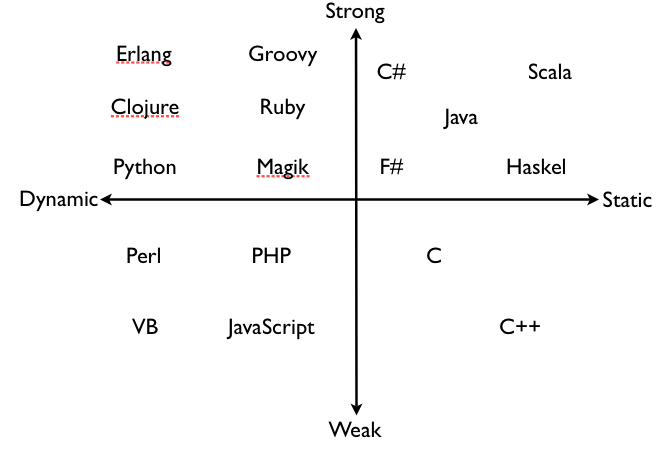
One thing I’ve realized, Strong vs. Weak and Dynamic vs. Static is a continuum rather than an absolute measure. For instance, SmallTalk is more strongly typed compared to Python which is more strongly typed than JavaScript.
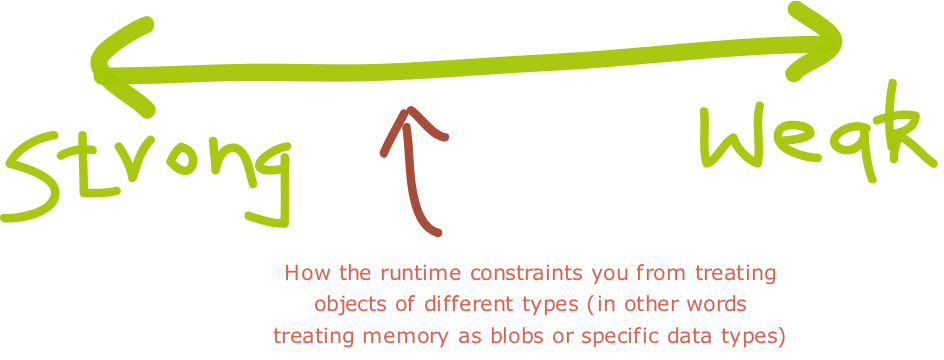
There seem to be two major lines along which strong/weak typing is defined:
- The more type coercions (implicit conversions) for built-in operators the language offers, the weaker the typing. (This could also be viewed as more built-in overloading of built-in operators.)
- The easier it is in a language, or the more ways a language offers, to reinterpret a memory block (associated with a data value) as a different type, the weaker the typing.
In strongly typed languages if you cast to the wrong type, you get a runtime cast exception. While in weakly typed languages, your program might crash if you are lucky. Usually it leads to wrong behavior.
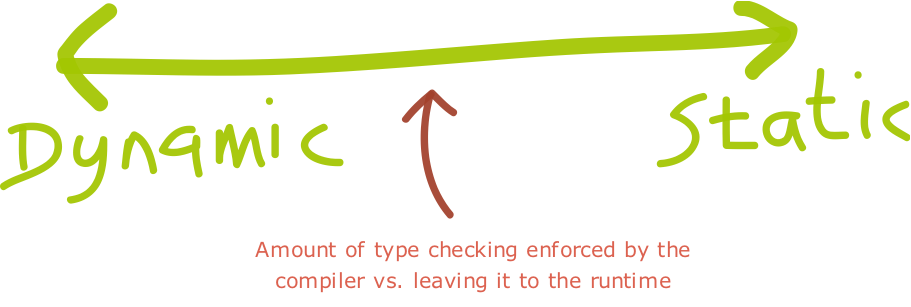
In most static languages you need to specify the data type at declaration. However in languages like Scala, you don’t need to specify the data types, the compiler is smart enough to infer the data types based in the context in which its used.
Also if you don’t have a compiler, then the language is surely dynamic language. However the inverse is not true. For example, Groovy is compiled, yet its a dynamic language.
In Strongly typed Dynamic languages, the type inference is postponed till runtime. This has many advantages:
- One can achieve greater degree of polymorphism
- One does not need to keep fighting the compiler by doing trivial type casting
- One gets greater flexibility by deferring the implementation to a later point. i.e. the actual type verification is postponed to runtime; allowing us to modify the structure of the program between compile time and runtime.
I always thought weakly typed, dynamic language would be a disaster. However both VB and PHP (amongst most popular languages in the last 2 decades) fall into this category.
Having said that, these days I see more and more languages are strongly typed. Also the ability to infer types is gaining a lot of traction.
What do you prefer in your programming language and why?
Posted in Design, Programming, Programming Languages | 3 Comments »
|