`
| |
|
Archive for the ‘Linux’ Category
Sunday, October 9th, 2011
We have a few Red Hat Enterprise Linux servers, all run ConfigServer and Security (CSF), which is a Stateful Packet Inspection (SPI) firewall, Login/Intrusion Detection and Security application for Linux servers. Amongst various other things, it looks for port scans, multiple login failures and other things that it thinks are ominous, and locks out the originating IP address by rewriting the iptables firewall rules.
For example, if you try to connect to the same server via http, https, ssh and svn within some short window of time, you are quite likely to incur its wrath. Developers at Industrial Logic often lock themselves out by getting blacklisted.
Generally when this happens, we ssh into one of our other server, connect to the server that has blacklisted us, and execute the following command to see what is going on:
$ sudo /usr/sbin/csf -t
| A/D |
IP address |
Port |
Dir |
Time To Live |
Comment |
| DENY |
117.193.150.62 |
* |
in |
9m 58s |
lfd – *Port Scan* detected from 117.193.150.62 (IN/India/-). 11 hits in the last 36 seconds |
As you can see, csf blacklisted my IP for port scanning.
If your IP is the only record, you can flush the whole temporary block list by executing:
$ sudo /usr/sbin/csf -tf
DROP all opt — in !lo out * 117.193.150.62 -> 0.0.0.0/0
csf: 117.193.150.62 temporary block removed
csf: There are no temporary IP allows
Alternatively you can execute the following command to just remove a specific IP:
$ sudo /usr/sbin/csf -tr
The easiest way to find your (external) IP address is to visit http://www.whatsmyip.org/
If you have a static IP, then you can whitelist yourself by:
$ sudo /usr/sbin/csf -a
Posted in Deployment, Hosting, Linux, Tools | 1 Comment »
Sunday, July 10th, 2011
Recently an important client of Industrial Logic’s eLearning reported that access to our Agile eLearning website was extremely slow (23+ secs per page load.) This came as a shock; we’ve never seen such poor performance from any part of the world. Besides, a 23+ secs page load basically puts our eLearning in the category of “useless junk”.
| From China |
From India |
 |
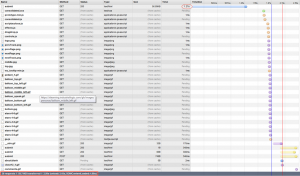 |
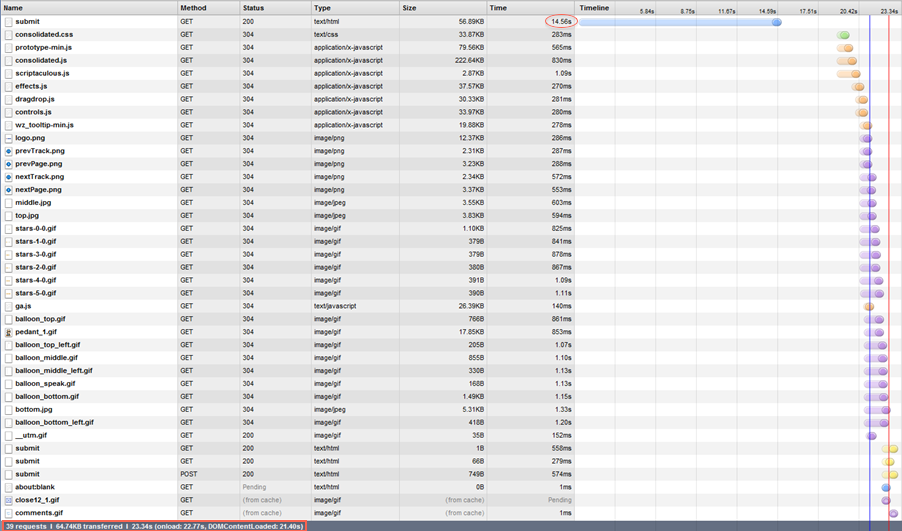
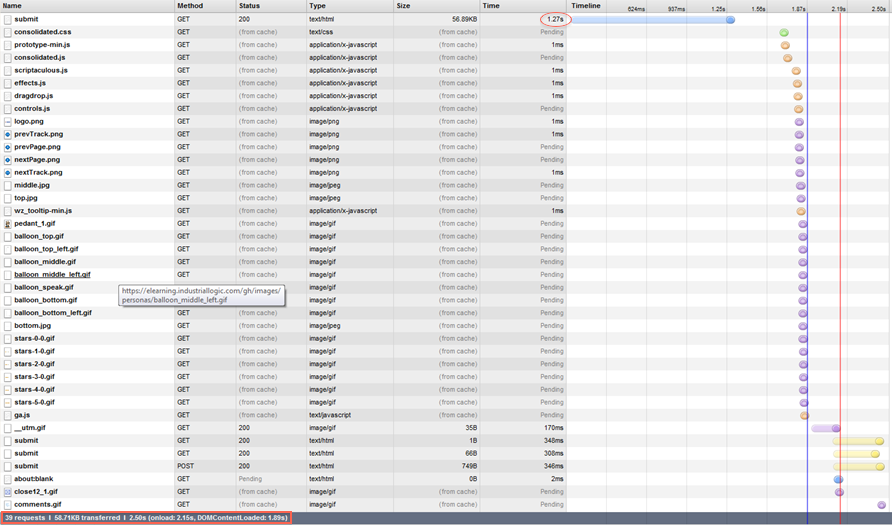
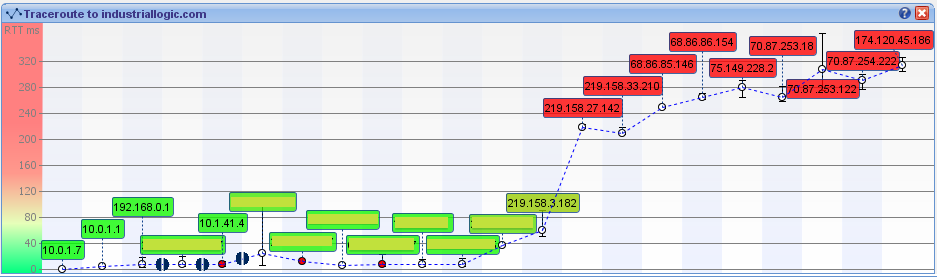
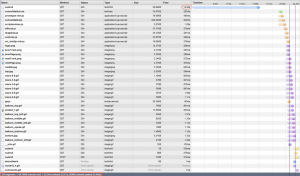
Notice that from China its taking 23.34 secs, while from any other country it takes less than 3 secs to load the page. Clearly the problem was when the request originated from China. We suspected network latency issues. So we tried a traceroute.
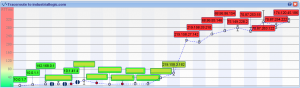
Sure enough, the traceroute does look suspicious. But then soon we realized the since traceroute and web access (http) uses different protocols, they could use completely different routes to reach the destination. (In fact, China has a law by which access to all public websites should go through the Chinese Firewall [The Great Wall]. VPN can only be used for internal server access.)
Ahh..The Great Wall! Could The Great Wall have something to do with this issue?
To nail the issue, we used a VPN from China to test our site. Great, with the VPN, we were getting 3 secs page load.
After cursing The Great Wall; just as we were exploring options for hosting our server inside The Great Wall, we noticed something strange. Certain pages were loading faster than others consistently. On further investigation, we realized that all pages served from our Windows servers were slower by at least 14 secs compared to pages served by our Linux servers.
Hmmm…somehow the content served by our Windows Server is triggering a check inside the Great Wall.
What keywords could the Great Wall be checking for?
Well, we don’t have any option other than brute forcing the keywords.
Wait a sec….we serve our content via HTTPS, could the Great Wall be looking for keywords inside a HTTPS stream? Hope not!
May be it has to do with some difference in the headers, since most firewalls look at header info to take decisions.
But after thinking a little more, it occurred to me that there cannot be any header difference (except one parameter in the URL and may be something in the Cookie.) That’s because we use Nginx as our reverse proxy. The actual content being served from Windows or Linux servers should be transparent to clients.
Just to be sure that something was not slipping by, we decided to do a small experiment. Have the exact same content served by both Windows and Linux box and see if it made any difference. Interestingly the exact same content served from Windows server is still slow by at least 14 secs.
Let’s look at the server response from the browser again:
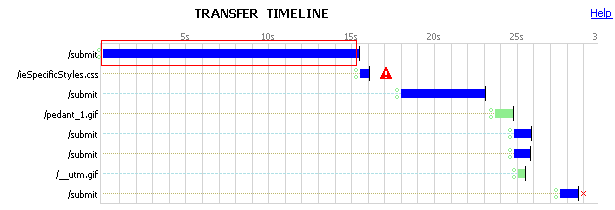
Notice the 15 secs for the initial response to the submit request. This happens only when the request is served by the Windows Server.
We had to look deeper into where those 15 secs are coming from. So we decided to take a deeper look, by using some network analysis tool. And look what we found:
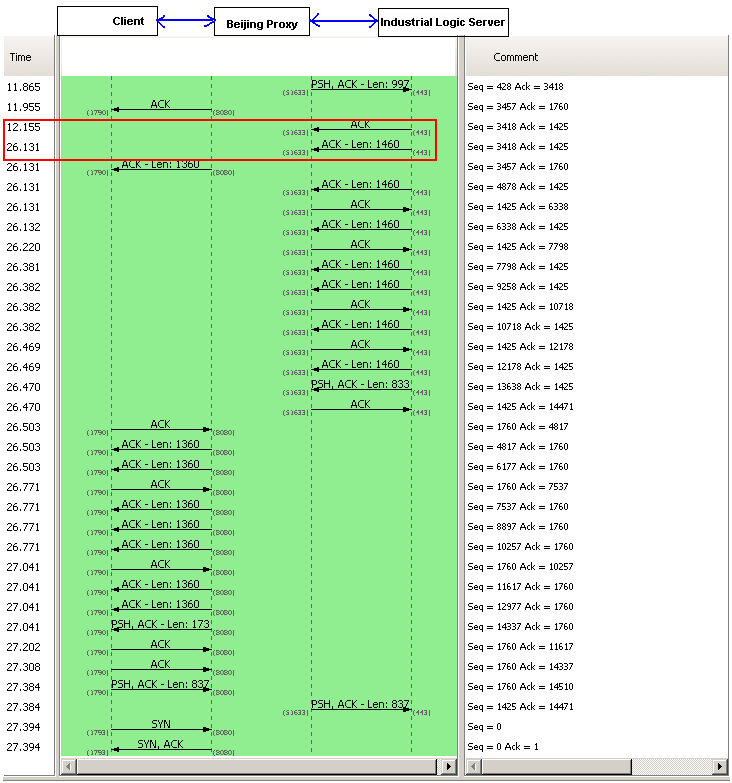
A 14+ sec response from our server side. However this happens only when the request is coming from China. Since our application does not have any country specific code, who else could be interfering with this? There are 3 possibilities:
- Firewall settings on the Windows Server: It was easy to rule this out, since we had disabled the firewall for all requests coming from our Reverse Proxy Server.
- Our Datacenter Network Settings: To prevent against DDOS Attacks from Chinese Hackers. A possibility.
- Low level Windows Network Stack: God knows what…
We opened a ticket with our Datacenter. They responded back with their standard response (from a template) saying: “Please check with your client’s ISP.”
Just as I was loosing hope, I explained this problem to Devdas. When he heard 14 secs delay, he immediately told me that it sounds like a standard Reverse DNS Lookup timeout.
I was pretty sure we did not do any reverse DNS lookup. Besides if we did it in our code, both Windows and Linux Servers should have the same delay.
To verify this, we installed Wire Shark on our Windows servers to monitor Reverse DNS Lookup. Sure enough, nothing showed up.
I was loosing hope by the minute. Just out of curiosity, one night, I search our whole code base for any reverse DNS lookup code. Surprise! Surprise!
I found a piece of logging code, which was taking the User IP and trying to find its host name. That has to be the culprit. But then why don’t we see the same delay on Linux server?
On further investigation, I figured that our Windows Server did not have any DNS servers configured for the private Ethernet Interface we were using, while Linux had it.
Eliminated the useless logging code and configured the right DNS servers on our Windows Servers. And guess what, all request from Windows and Linux now are served in less than 2 secs. (better than before, because we eliminated a useless reverse DNS lookup, which was timing out for China.)
This was fun! Great learning experience.
Posted in Deployment, Hosting, HTTP, Linux, Networking, Windows | 1 Comment »
Sunday, April 10th, 2011
Over the last 6 months, I’ve been blessed with various pharma hacks on almost all my site.
(http://agilefaqs.com, http://agileindia.org, http://sdtconf.com, http://freesetglobal.com, http://agilecoachcamp.org, to name a few.)
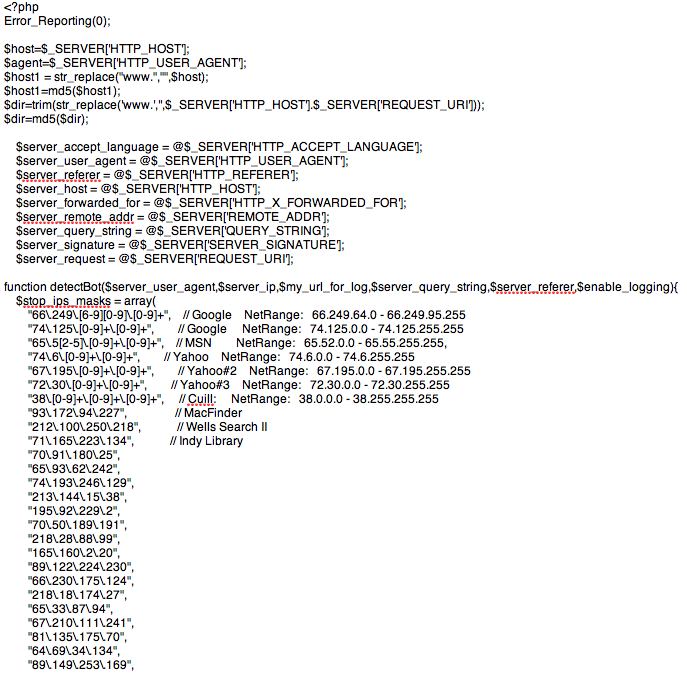
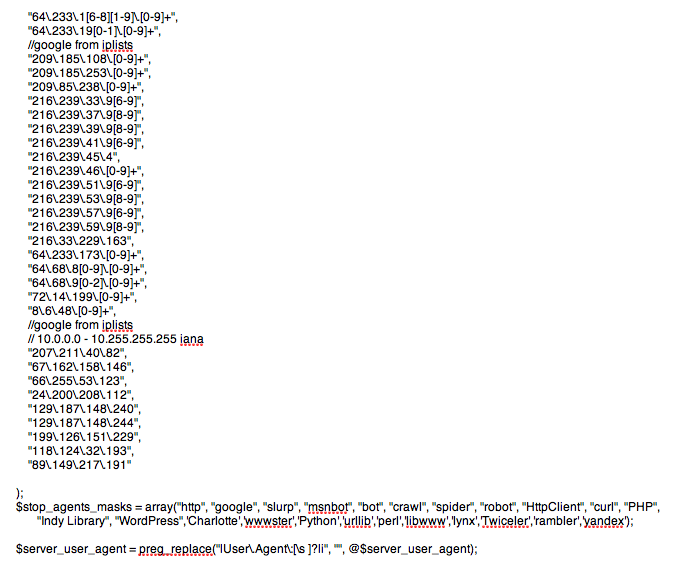
This is one of the most clever hacks I’ve seen. As a normal user, if you visit the site, you won’t see any difference. Except when search engine bots visit the page, the page shows up with a whole bunch of spammy links, either at the top of the page or in the footer. Sample below:

Clearly the hacker is after search engine ranking via backlinks. But in the process suddenly you’ve become a major pharma pimp.
There are many interesting things about this hack:
- 1. It affects all php sites. WordPress tops the list. Others like CMS Made Simple and TikiWiki are also attacked by this hack.
- 2. If you search for pharma keywords on your server (both files and database) you won’t find anything. The spammy content is first encoded with MIME base64 and then deflated using gzdeflate. And at run time the content is eval’ed in PHP.
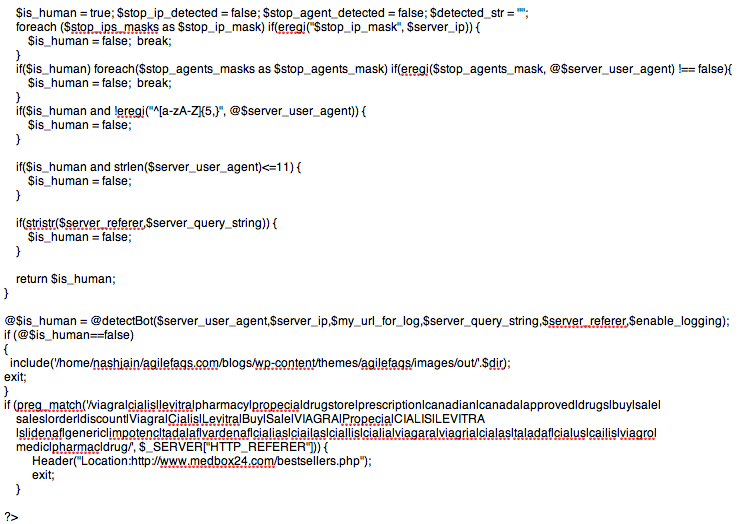
This is how the hacked PHP code looks like:

If you inflate and decode this code it looks like:
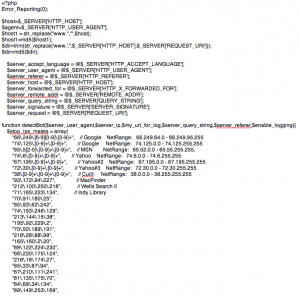
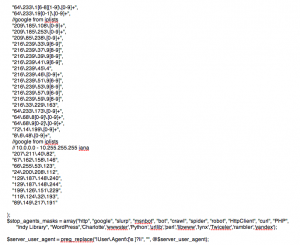
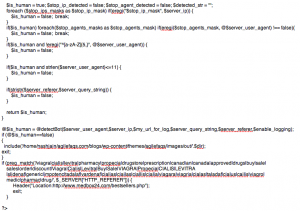
- 3. Well documented and mostly self descriptive code.
- 4. Different PHP frameworks have been hacked using slightly different approach:
- In WordPress, the hackers created a new file called wp-login.php inside the wp-includes folder containing some spammy code. They then modified the wp-config.php file to include(‘wp-includes/wp-login.php’). Inside the wp-login.php code they further include actually spammy links from a folder inside wp-content/themes/mytheme/images/out/’.$dir’
- In TikiWiki, the hackers modified the /lib/structures/structlib.php to directly include the spammy code
- In CMS Made Simple, the hackers created a new file called modules/mod-last_visitor.php to directly include the spammy code.
Again the interesting part here is, when you do ls -al you see:
-rwxr-xr-x 1 username groupname 1551 2008-07-10 06:46 mod-last_tracker_items.php
-rwxr-xr-x 1 username groupname 44357 1969-12-31 16:00 mod-last_visitor.php
-rwxr-xr-x 1 username groupname 668 2008-03-30 13:06 mod-last_visitors.php
In case of WordPress the newly created file had the same time stamp as the rest of the files in that folder
How do you find out if your site is hacked?
- 1. After searching for your site in Google, check if the Cached version of your site contains anything unexpected.

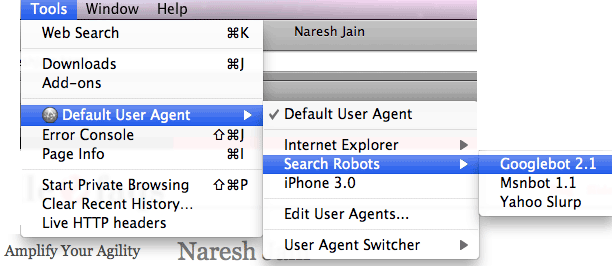
- 2. Using User Agent Switcher, a Firefox extension, you can view your site as it appears to Search Engine bot. Again look for anything suspicious.
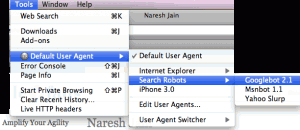
- 3. Set up Google Alerts on your site to get notification when something you don’t expect to show up on your site, shows up.
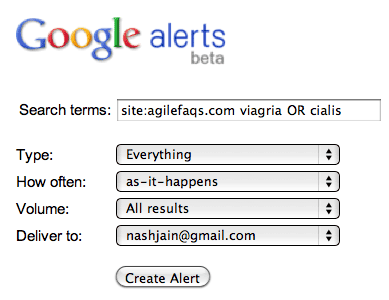
- 4. Set up a cron job on your server to run the following commands at the top-level web directory every night and email you the results:
- mysqldump your_db into a file and run
- find . | xargs grep “eval(gzinflate(base64_decode(“
If the grep command finds a match, take the encoded content and check what it means using the following site: http://www.tareeinternet.com/scripts/decrypt.php
If it looks suspicious, clean up the file and all its references.
Also there are many other blogs explaining similar, but different attacks:
Hope you don’t have to deal with this mess.
Posted in Deployment, Hosting, Linux, Open Source, SEO, Tips | 2 Comments »
Monday, April 5th, 2010
Recently I was trying to load a CSV file into a MySQL database on a Linux box using the following command:
LOAD DATA INFILE '/path/to/my_data.csv' INTO TABLE `my_data`
        FIELDS TERMINATED BY ',' ENCLOSED BY '"'
        LINES TERMINATED BY '\r\n';
I kept getting the following error:
ERROR 1045 (28000): Access denied for user …
After Googling around I got some suggestions:
- chown mysql.mysql my_data.csv; chmod 666 my_data.csv
- move the data file to /tmp folder, where all processes have read access
- Grant a FILE permissions to the user. Basically GRANT *.* usage.
- Load data LOCAL infile…
Nothing seemed to help.
Luckily I found the following command which did the job:
mysqlimport -v --local --fields-enclosed-by='"'
        --fields-escaped-by='\'
        --fields-terminated-by=','
        --lines-terminated-by='\r\n'
        -u[db_user] -p[db_password] -h [hostname] [db_name]
        '/path/to/my_data.csv'
Posted in Database, Deployment, Linux | 3 Comments »
Saturday, October 8th, 2005
Recently over a conversation, my tech lead mentioned that he thinks the GNU project is a failure. His point of view is that after two decades they have never released a complete GNU operating system suitable for production use. He also mentioned that apart from Richard Stallman, no one else thinks of Linux as GNU/Linux. [He was glad to meet the second person].
I almost freaked out hearing this. Since then, I spoke to a few other people who felt the same. I was thinking to myself, this is what I call, “missing the forest for a tree“.
I think Free Software Foundation [FSF] is one of the most successful movements in the history of humanity. And I consider the GNU project as a big success. To justify this, we need to look at the history of the GNU project and the FSF in general.
In 1983, Richard Stallman quit this job at MIT to begin developing a free software operating system. His hope was that a free operating system would open a path to escape forever from the system of subjugation which is proprietary software. He had then experienced the ugliness of the way of life that non-free software imposes on its users, and he was determined to escape and give others a way to escape.
The word “free“ in “free software” pertains to freedom, not price. Once you have the software you have three specific freedoms in using it.
1. The freedom to copy the program and give it away to your friends and co-workers;
2. The freedom to change the program as you wish, by having full access to source code;
3. The freedom to distribute an improved version and thus help build the community.
The GNU Project was conceived in 1983 as a way of bringing back the cooperative spirit that prevailed in the computing community in earlier days. To make cooperation possible once again it was important to remove the obstacles imposed by the owners of proprietary software.
FSF decided to make the operating system compatible with UNIX. A Unix-like operating system is much more than a kernel; it also includes compilers, editors, text formatters, mail software and many other things. Unfortunately many people think that an operating system means a kernel and everything else is secondary.
By 1990 FSF had either found or written all the major components except the kernel. By then Linux was developed by Linus Torvalds and made free software in 1992. Since Linus decided to release the Linux kernel under the GNU public license [GPL], FSF thought combining Linux with the almost-complete GNU system would be the right thing to do. Today we have a huge number of people who are using this operating system and are experiencing the freedom which Richard Stallman had dreamt of.
Another important point to consider is would Linux be possible without GCC and the other libraries which Linus used? Again I‘m not saying it would be impossible, but it‘s all about helping each other to solve a common problem.
Who cares if it is called Linux or GNU/Linux? GNU‘s intension was to come up with a free operating system. This does not mean they have to write everything from scratch. Their idea was to reuse whatever is available and write software which was not available or not free.
So today we do have a free operating system, which is been used and relished by countless users. The good news is for FSF the ultimate goal is to provide free software to do all of the jobs computer users want to do and thus make proprietary software obsolete.
Please remember, its freedom of software in the spirit of community building and not satisfying personal egos.
Must read : http://www.gnu.org/gnu/gnu-history.html
Posted in Linux | No Comments »
Friday, May 13th, 2005
Recently I was interviewed by a Journal. Following is a section of it.
1. Is Linux to make a breakthrough on the desktop? : Yes
Linux has always been a hacker‘s paradise. Linux started as a college project and slowly came to the limelight with the Internet & open source wave. Linus Torvalds started branding LINUX as ‘Just for FUN‘ OS. In mid 1990‘s, Linux started replacing lot of Unix, Solaris & Windows servers. Its performance, stability and cost factors proved Linux to be best suited on the server side. By late1990‘s Linux had captures almost 30% of the Server market share. This proved to be a great boost to the Linux community and Open Source Community in general. At this point, seeing the performance, stability, cost factor and n other benefits, the Linux community started considering Linux as a good option for desktops.
(I feel the saddest part of Linux is that it‘s always been compared to Windows by end-users. Most of the people I meet & talk about Linux inevitably start comparing Linux with Windows. I think this might be one of the strongest forces behind Linux moving to the desktop world. Personally I‘m not a supporter of Linux as a desktop. It‘s such an under utilization of a powerful OS like Linux.)
At this point most of the Linux distros(Flavors) started concentrating on the GUI part of Linux. KDE, GNOME, Ximian (now Novel) and many others came up with excellent X-windows support for Linux. In fact, I remember, KDE 2.0 was release and then Microsoft came with their Windows XP and lots of end users started saying, “What happened to Microsoft, why are they copying Linux desktop style+“ Listening to this statement alone makes one feel that Linux is sure to make a breakthrough in the desktop world.
Looking at the various options & the level of customization available in Linux, I‘m sure there is no other desktop OS in this category. It‘s worth noting that Linux not only runs on workstations, mid- and high-end servers, but also on “gadgets” like PDA‘s, PCs, mobiles, a shipload of embedded applications and even on experimental wristwatches. The Linux kernel gives you the flexibility to run a decent desktop on a 486 machines with 4 MB RAM.
The number of projects running in big companies like SUN (Mad Hatter project), Novel, Red Hat, HP, etc is valid enough for one to conclude that Linux has already made a breakthrough in the desktop world.
2. Why are financial services companies in Linux? : To make business
Based on my experience with a few banks & financial companies, Linux is still in an R&D phase of its implementation. Small banks & financial institutions have moved more positively to Linux than the big players. Following are the compelling reasons for companies to consider Linux
+Low Total Cost of Ownership
+Performance
+Security : (which some are still not convinced)
+Stability : (again some are still in the R&D phase)
+Scalability
+Long Term Cost Savings
+Linux running on any possible hardware. So they don‘t have to invest in new infrastructure
+Avoid vendor lock
+Ease of use : Especially for hosting websites, running some servers, etc
+Almost all types of file systems & file extensions work : Greater flexibility
+More control & customization : OS is no more a black box
+Software availability : anything from .exe to .sh runs on Linux
With such great advantages its too tempting for any one to resist. But as I pointed out earlier, Linux is still under the R&D phase. Lot of financial institutions have started replacing their Windows & UNIX boxes with Linux boxes. But as of now, in most of the big places this is done only on few workstations and servers running non-critical business apps. Mostly the internal apps have been moved to Linux mainly to cut costs.
The biggest disadvantage that the end users see (rather, used to see) in Linux is lack of big software service companies backing Linux. This lack of backing is usually perceived as lack of support. This is the key for the service companies. Most of the financial service companies (in general all the service companies) are pitching themselves as ?Support Providers‘ and gradually moving to app developers on Linux platform. (Note that usually I refer to Linux as a platform rather than an OS). This is the beginning of a new era where custom applications are developed on Linux, for Linux.
3. What‘s next? : Microsoft goes bankrupt
Well, future is uncertain, but there are surely some things about Linux that can be predicted. We have seen Linux capture the hacker‘s world, then moved to capture the server world & now to the desktop world. There are huge efforts going on to move Linux from this R&D phase to a full-fledged implementation phase. We have seen some banks & financial institutions move there non-critical business apps to Linux boxes. On successful implementation of these, I‘m sure they would move all their business apps to Linux servers. As this would happens, we would also see a lot of desktops & workstations being migrated to Linux. The service companies have a lot to gain in this move, if they are well equipped.
Even in service companies, all the source control servers, mail servers, domain servers, test labs, etc have been migrated to Linux platform. Slowly we‘ll see all the developer and QA machines also move to Linux. I cannot think of any place where Linux cannot work. It‘s evolving at such a great pace and is so customizable that it will soon fit all the requirements. Nonetheless, Linux is not the ultimate in the OS world; it‘s still evolving and has a pretty steep learning curve.
Posted in Linux | No Comments »
Wednesday, March 23rd, 2005
- Log into the CVS repository server
- Go to the cvs root dir
- tar the whole cvs root dir using the following command tar -zcvf tarfileName .
- copy this tar file to the new cvs repository server under the appropriate directory
- untar the file using the following command tar -zxvf tarFileName
- Delete the CVSROOT folder
- Make sure on the new CVS repository server you have a group created called cvsUsers
- Change the ownership and group permission for access using the following commands
- chown -R ./
- chgrp -R ./
- chmod -R 775 ./
- chmod -R +s ./
- Execute the following command to initialize the CVS repository cvs -d init. This will create the CVSROOT folder under the cvs root directory
- Game over!
Posted in Linux | 3 Comments »
Thursday, January 27th, 2005
After struggling with Gnome for a month, I finally decide to switch back to KDE . KDE is so much more intuitive to me. If you have to simultaneously work on Windows (for various reasons) and Linux, gnome just throws you apart. May be I could not setup gnome…
Posted in Linux | No Comments »
Wednesday, January 12th, 2005
1. Configuration changes
vi /etc/samba/smb.conf
Under the [global] section, specify the following
workgroup =
hosts allow = 127.
Under the [tmp] section, uncomment the following
comment = Temporary file space
path = /tmp
read only = No
guest…
Posted in Linux | No Comments »
Tuesday, January 4th, 2005
Caution: While using GNOME as the window-manager, you wont be able to lock your screen display. Unfortunately, when you click on this option in the menu, nothing happens. One might wonder, while all the other options in the menu work, why is this not…
Posted in Linux | No Comments »
|