`
| |
|
Archive for the ‘Database’ Category
Friday, October 19th, 2012
Recently I realized that in MySQL if you declare a column as type TIMESTAMP, it would be automatically updated to the current time stamp any time the row is updated.
mysql> CREATE TABLE IF NOT EXISTS `MyTable` (
`id` int(10) NOT NULL auto_increment,
`name` varchar(50) NOT NULL,
`expiry_date` TIMESTAMP NOT NULL,
PRIMARY KEY (`id`)
) ENGINE=MyISAM DEFAULT CHARSET=utf8 AUTO_INCREMENT=1;
mysql> desc MyTable;
| Field |
Type |
Null |
Key |
Default |
Extra |
| id |
int(3) |
NO |
PRI |
NULL |
auto_increment |
| name |
varchar(50) |
NO |
|
NULL |
|
| expiry_date |
timestamp |
NO |
|
CURRENT_TIMESTAMP |
on update CURRENT_TIMESTAMP |
If you don’t want this behavior then you can use the following command:
mysql> ALTER TABLE MyTable CHANGE expiry_date expiry_date TIMESTAMP NOT NULL DEFAULT CURRENT_TIMESTAMP;
mysql> desc MyTable;
| Field |
Type |
Null |
Key |
Default |
Extra |
| id |
int(3) |
NO |
PRI |
NULL |
auto_increment |
| name |
varchar(50) |
NO |
|
NULL |
|
| expiry_date |
timestamp |
NO |
|
CURRENT_TIMESTAMP |
|
Point is, Timestamps in MySQL are generally used to track changes to records, and are updated every time the record is changed. However if you want to store a specific value and don’t want it updated, its best you use a DATETIME field.
Change it using the following command:
mysql> ALTER TABLE MyTable CHANGE expiry_date expiry_date DATETIME NOT NULL DEFAULT ‘2012-10-01 00:00:00’;
mysql> desc MyTable;
| Field |
Type |
Null |
Key |
Default |
Extra |
| id |
int(3) |
NO |
PRI |
NULL |
auto_increment |
| name |
varchar(50) |
NO |
|
NULL |
|
| expiry_date |
datetime |
NO |
|
2012-10-01 00:00:00 |
|
I also learned that if a table has 2 Timestamps than MySQL does not know which one it needs to do an auto update. Hence this behavior does not work. The work around is:
mysql> CREATE TABLE IF NOT EXISTS `AnotherTable` (
`id` int(10) NOT NULL auto_increment,
`name` varchar(150) NOT NULL,
`creation_date` TIMESTAMP DEFAULT ‘0000-00-00 00:00:00’,
`last_updated` TIMESTAMP DEFAULT now() on update now(),
PRIMARY KEY (`id`)
) ENGINE=MyISAM DEFAULT CHARSET=utf8 AUTO_INCREMENT=1;
Posted in Database | No Comments »
Wednesday, June 22nd, 2011
Just learned today that for char or varchar columns, MySQL ignores trailing white spaces for comparison in a select statement’s where clause.
This came as a surprise because I was thinking that the string ‘[email protected]’ is different from ‘[email protected] ‘.
mysql> CREATE TABLE `mysql_trailing_test` (
`id` BIGINT(20) NOT NULL AUTO_INCREMENT,
`name` VARCHAR(20) NOT NULL,
`email` VARCHAR(50) NOT NULL,
PRIMARY KEY (`id`),
UNIQUE KEY `email` (`email`)
) ENGINE=MyISAM DEFAULT CHARSET=utf8; |
mysql> CREATE TABLE `mysql_trailing_test` (
`id` bigint(20) NOT NULL AUTO_INCREMENT,
`name` varchar(20) NOT NULL,
`email` varchar(50) NOT NULL,
PRIMARY KEY (`id`),
UNIQUE KEY `email` (`email`)
) ENGINE=MyISAM DEFAULT CHARSET=utf8; mysql> SELECT * FROM `mysql_trailing_test` WHERE name='Naresh'; |
mysql> select * from `mysql_trailing_test` where name='Naresh'; 1 row in set (0.01 sec)
Perfect, as expected. But watch now:
mysql> SELECT * FROM `mysql_trailing_test` WHERE name='Naresh '; |
mysql> select * from `mysql_trailing_test` where name='Naresh '; 1 row in set (0.01 sec)
AND
mysql> SELECT * FROM `mysql_trailing_test` WHERE name='Naresh'; |
mysql> select * from `mysql_trailing_test` where name='Naresh'; 2 row in set (0.01 sec)
Also because of this, if you had a unique constraint on the column and tried to insert another value with trailing space, MySQL would return ERROR 1062 (23000): Duplicate entry.
mysql> INSERT INTO `mysql_trailing_test` VALUES (3, 'Naresh ', '[email protected] '); |
mysql> INSERT INTO `mysql_trailing_test` VALUES (3, 'Naresh ', '[email protected] '); ERROR 1062 (23000): Duplicate entry ‘[email protected] ‘ for key ’email’
More details on MySQL Documentation: The CHAR and VARCHAR Types
Posted in Database | 1 Comment »
Tuesday, September 7th, 2010
WP Security Scan Plugin suggests that wordpress users should rename the default wordpress table prefix of wp_ to something else. When I try to do so, I get the following error:
Your User which is used to access your WordPress Tables/Database, hasn’t enough rights( is missing ALTER-right) to alter your Tablestructure. Please visit the plugin documentation for more information. If you believe you have alter rights, please contact the plugin author for assistance.
Even though the database user has all the required permissions, I was not successful.
Then I stumbled across this blog which shows how to manually update the table prefix.
Inspired by this blog I came up with the following steps to change wordpress table prefix using SQL Scripts.
1- Take a backup
You are about to change your WordPress table structure, it’s recommend you take a backup first.
mysqldump -uuser_name -ppassword -h host db_name > dbname_backup_date.sql |
mysqldump -uuser_name -ppassword -h host db_name > dbname_backup_date.sql 2- Edit your wp-config.php file and change
$table_prefix = ‘wp_’;
to something like
$table_prefix = ‘your_prefix_’;
3- Change all your WordPress table names
$mysql -uuser_name -ppassword -h host db_name

RENAME TABLE wp_blc_filters TO your_prefix_blc_filters;
RENAME TABLE wp_blc_instances TO your_prefix_blc_instances;
RENAME TABLE wp_blc_links TO your_prefix_blc_links;
RENAME TABLE wp_blc_synch TO your_prefix_blc_synch;
RENAME TABLE wp_captcha_keys TO your_prefix_captcha_keys ;
RENAME TABLE wp_commentmeta TO your_prefix_commentmeta;
RENAME TABLE wp_comments TO your_prefix_comments ;
RENAME TABLE wp_links TO your_prefix_links;
RENAME TABLE wp_options TO your_prefix_options;
RENAME TABLE wp_postmeta TO your_prefix_postmeta ;
RENAME TABLE wp_posts TO your_prefix_posts;
RENAME TABLE wp_shorturls TO your_prefix_shorturls;
RENAME TABLE wp_sk2_logs TO your_prefix_sk2_logs ;
RENAME TABLE wp_sk2_spams TO your_prefix_sk2_spams;
RENAME TABLE wp_term_relationships TO your_prefix_term_relationships ;
RENAME TABLE wp_term_taxonomy TO your_prefix_term_taxonomy;
RENAME TABLE wp_terms TO your_prefix_terms;
RENAME TABLE wp_ts_favorites TO your_prefix_ts_favorites ;
RENAME TABLE wp_ts_mine TO your_prefix_ts_mine;
RENAME TABLE wp_tweetbacks TO your_prefix_tweetbacks ;
RENAME TABLE wp_usermeta TO your_prefix_usermeta ;
RENAME TABLE wp_users TO your_prefix_users;
RENAME TABLE wp_yarpp_keyword_cache TO your_prefix_yarpp_keyword_cache;
RENAME TABLE wp_yarpp_related_cache TO your_prefix_yarpp_related_cache; |
$mysql -uuser_name -ppassword -h host db_name
Rename table wp_blc_filters TO your_prefix_blc_filters;
Rename table wp_blc_instances TO your_prefix_blc_instances;
Rename table wp_blc_links TO your_prefix_blc_links;
Rename table wp_blc_synch TO your_prefix_blc_synch;
Rename table wp_captcha_keys TO your_prefix_captcha_keys ;
Rename table wp_commentmeta TO your_prefix_commentmeta;
Rename table wp_comments TO your_prefix_comments ;
Rename table wp_links TO your_prefix_links;
Rename table wp_options TO your_prefix_options;
Rename table wp_postmeta TO your_prefix_postmeta ;
Rename table wp_posts TO your_prefix_posts;
Rename table wp_shorturls TO your_prefix_shorturls;
Rename table wp_sk2_logs TO your_prefix_sk2_logs ;
Rename table wp_sk2_spams TO your_prefix_sk2_spams;
Rename table wp_term_relationships TO your_prefix_term_relationships ;
Rename table wp_term_taxonomy TO your_prefix_term_taxonomy;
Rename table wp_terms TO your_prefix_terms;
Rename table wp_ts_favorites TO your_prefix_ts_favorites ;
Rename table wp_ts_mine TO your_prefix_ts_mine;
Rename table wp_tweetbacks TO your_prefix_tweetbacks ;
Rename table wp_usermeta TO your_prefix_usermeta ;
Rename table wp_users TO your_prefix_users;
Rename table wp_yarpp_keyword_cache TO your_prefix_yarpp_keyword_cache;
Rename table wp_yarpp_related_cache TO your_prefix_yarpp_related_cache; 4- Edit wp_options table
UPDATE your_prefix_options SET option_name='your_prefix_user_roles' WHERE option_name='wp_user_roles'; |
update your_prefix_options set option_name='your_prefix_user_roles' where option_name='wp_user_roles'; 5- Edit wp_usermeta
UPDATE your_prefix_usermeta SET meta_key='your_prefix_autosave_draft_ids' WHERE meta_key='wp_autosave_draft_ids';
UPDATE your_prefix_usermeta SET meta_key='your_prefix_capabilities' WHERE meta_key='wp_capabilities';
UPDATE your_prefix_usermeta SET meta_key='your_prefix_dashboard_quick_press_last_post_id' WHERE meta_key='wp_dashboard_quick_press_last_post_id';
UPDATE your_prefix_usermeta SET meta_key='your_prefix_user-settings' WHERE meta_key='wp_user-settings';
UPDATE your_prefix_usermeta SET meta_key='your_prefix_user-settings-time' WHERE meta_key='wp_user-settings-time';
UPDATE your_prefix_usermeta SET meta_key='your_prefix_usersettings' WHERE meta_key='wp_usersettings';
UPDATE your_prefix_usermeta SET meta_key='your_prefix_usersettingstime' WHERE meta_key='wp_usersettingstime'; |
update your_prefix_usermeta set meta_key='your_prefix_autosave_draft_ids' where meta_key='wp_autosave_draft_ids';
update your_prefix_usermeta set meta_key='your_prefix_capabilities' where meta_key='wp_capabilities';
update your_prefix_usermeta set meta_key='your_prefix_dashboard_quick_press_last_post_id' where meta_key='wp_dashboard_quick_press_last_post_id';
update your_prefix_usermeta set meta_key='your_prefix_user-settings' where meta_key='wp_user-settings';
update your_prefix_usermeta set meta_key='your_prefix_user-settings-time' where meta_key='wp_user-settings-time';
update your_prefix_usermeta set meta_key='your_prefix_usersettings' where meta_key='wp_usersettings';
update your_prefix_usermeta set meta_key='your_prefix_usersettingstime' where meta_key='wp_usersettingstime';
Posted in Database, Deployment, Hosting, Open Source, Tips | 1 Comment »
Monday, April 5th, 2010
Recently I was trying to load a CSV file into a MySQL database on a Linux box using the following command:
LOAD DATA INFILE '/path/to/my_data.csv' INTO TABLE `my_data`
        FIELDS TERMINATED BY ',' ENCLOSED BY '"'
        LINES TERMINATED BY '\r\n';
I kept getting the following error:
ERROR 1045 (28000): Access denied for user …
After Googling around I got some suggestions:
- chown mysql.mysql my_data.csv; chmod 666 my_data.csv
- move the data file to /tmp folder, where all processes have read access
- Grant a FILE permissions to the user. Basically GRANT *.* usage.
- Load data LOCAL infile…
Nothing seemed to help.
Luckily I found the following command which did the job:
mysqlimport -v --local --fields-enclosed-by='"'
        --fields-escaped-by='\'
        --fields-terminated-by=','
        --lines-terminated-by='\r\n'
        -u[db_user] -p[db_password] -h [hostname] [db_name]
        '/path/to/my_data.csv'
Posted in Database, Deployment, Linux | 3 Comments »
Saturday, January 9th, 2010
After switching to the DBCP (Database Connection Pool) drivers that comes bundled with Tomcat 5+, we started seeing a weird exception on our web app. If we leave our server idle for a long time (5-6 hrs) or if we put our laptop to sleep and 5-6+ hrs later when we bring up the laptop and try to access any page on our web app, we get the following error on the web page:
(The error was “could not inspect JDBC autocommit mode”)
When we see our logs, we find the following exception:
18:26:34,845 ERROR JDBCExceptionReporter:72 - Connection com.mysql.jdbc.JDBC4Connection@36fbe6ab is closed.
SEVERE: could not inspect JDBC autocommit mode
org.hibernate.exception.GenericJDBCException: could not inspect JDBC autocommit mode
	at org.hibernate.exception.SQLStateConverter.handledNonSpecificException(SQLStateConverter.java:103)
	at org.hibernate.exception.SQLStateConverter.convert(SQLStateConverter.java:91)
	at org.hibernate.exception.JDBCExceptionHelper.convert(JDBCExceptionHelper.java:43)
	at org.hibernate.exception.JDBCExceptionHelper.convert(JDBCExceptionHelper.java:29)
	at org.hibernate.jdbc.JDBCContext.afterNontransactionalQuery(JDBCContext.java:248)
	at org.hibernate.impl.SessionImpl.afterOperation(SessionImpl.java:417)
	at org.hibernate.impl.SessionImpl.list(SessionImpl.java:1577)
	at org.hibernate.impl.CriteriaImpl.list(CriteriaImpl.java:283)
	...
	at javax.servlet.http.HttpServlet.service(HttpServlet.java:617)
	at javax.servlet.http.HttpServlet.service(HttpServlet.java:717)
	at org.apache.catalina.core.ApplicationFilterChain.internalDoFilter(ApplicationFilterChain.java:290)
	at org.apache.catalina.core.ApplicationFilterChain.doFilter(ApplicationFilterChain.java:206)
	at org.apache.catalina.core.StandardWrapperValve.invoke(StandardWrapperValve.java:233)
	at org.apache.catalina.core.StandardContextValve.invoke(StandardContextValve.java:191)
	at org.apache.catalina.core.StandardHostValve.invoke(StandardHostValve.java:128)
	at org.apache.catalina.valves.ErrorReportValve.invoke(ErrorReportValve.java:102)
	at org.apache.catalina.core.StandardEngineValve.invoke(StandardEngineValve.java:109)
	at org.apache.catalina.ha.tcp.ReplicationValve.invoke(ReplicationValve.java:347)
	at org.apache.catalina.connector.CoyoteAdapter.service(CoyoteAdapter.java:286)
	at org.apache.coyote.http11.Http11Processor.process(Http11Processor.java:845)
	at org.apache.coyote.http11.Http11Protocol$Http11ConnectionHandler.process(Http11Protocol.java:583)
	at org.apache.tomcat.util.net.JIoEndpoint$Worker.run(JIoEndpoint.java:447)
	at java.lang.Thread.run(Thread.java:637)
Caused by: java.sql.SQLException: Connection com.mysql.jdbc.JDBC4Connection@36fbe6ab is closed.
	at org.apache.tomcat.dbcp.dbcp.DelegatingConnection.checkOpen(DelegatingConnection.java:354)
	at org.apache.tomcat.dbcp.dbcp.DelegatingConnection.getAutoCommit(DelegatingConnection.java:304)
	at org.apache.tomcat.dbcp.dbcp.PoolingDataSource$PoolGuardConnectionWrapper.getAutoCommit(PoolingDataSource.java:224)
	at org.hibernate.jdbc.ConnectionManager.isAutoCommit(ConnectionManager.java:185)
	at org.hibernate.jdbc.JDBCContext.afterNontransactionalQuery(JDBCContext.java:239)
... 29 more |
18:26:34,845 ERROR JDBCExceptionReporter:72 - Connection com.mysql.jdbc.JDBC4Connection@36fbe6ab is closed.
SEVERE: could not inspect JDBC autocommit mode
org.hibernate.exception.GenericJDBCException: could not inspect JDBC autocommit mode
at org.hibernate.exception.SQLStateConverter.handledNonSpecificException(SQLStateConverter.java:103)
at org.hibernate.exception.SQLStateConverter.convert(SQLStateConverter.java:91)
at org.hibernate.exception.JDBCExceptionHelper.convert(JDBCExceptionHelper.java:43)
at org.hibernate.exception.JDBCExceptionHelper.convert(JDBCExceptionHelper.java:29)
at org.hibernate.jdbc.JDBCContext.afterNontransactionalQuery(JDBCContext.java:248)
at org.hibernate.impl.SessionImpl.afterOperation(SessionImpl.java:417)
at org.hibernate.impl.SessionImpl.list(SessionImpl.java:1577)
at org.hibernate.impl.CriteriaImpl.list(CriteriaImpl.java:283)
...
at javax.servlet.http.HttpServlet.service(HttpServlet.java:617)
at javax.servlet.http.HttpServlet.service(HttpServlet.java:717)
at org.apache.catalina.core.ApplicationFilterChain.internalDoFilter(ApplicationFilterChain.java:290)
at org.apache.catalina.core.ApplicationFilterChain.doFilter(ApplicationFilterChain.java:206)
at org.apache.catalina.core.StandardWrapperValve.invoke(StandardWrapperValve.java:233)
at org.apache.catalina.core.StandardContextValve.invoke(StandardContextValve.java:191)
at org.apache.catalina.core.StandardHostValve.invoke(StandardHostValve.java:128)
at org.apache.catalina.valves.ErrorReportValve.invoke(ErrorReportValve.java:102)
at org.apache.catalina.core.StandardEngineValve.invoke(StandardEngineValve.java:109)
at org.apache.catalina.ha.tcp.ReplicationValve.invoke(ReplicationValve.java:347)
at org.apache.catalina.connector.CoyoteAdapter.service(CoyoteAdapter.java:286)
at org.apache.coyote.http11.Http11Processor.process(Http11Processor.java:845)
at org.apache.coyote.http11.Http11Protocol$Http11ConnectionHandler.process(Http11Protocol.java:583)
at org.apache.tomcat.util.net.JIoEndpoint$Worker.run(JIoEndpoint.java:447)
at java.lang.Thread.run(Thread.java:637)
Caused by: java.sql.SQLException: Connection com.mysql.jdbc.JDBC4Connection@36fbe6ab is closed.
at org.apache.tomcat.dbcp.dbcp.DelegatingConnection.checkOpen(DelegatingConnection.java:354)
at org.apache.tomcat.dbcp.dbcp.DelegatingConnection.getAutoCommit(DelegatingConnection.java:304)
at org.apache.tomcat.dbcp.dbcp.PoolingDataSource$PoolGuardConnectionWrapper.getAutoCommit(PoolingDataSource.java:224)
at org.hibernate.jdbc.ConnectionManager.isAutoCommit(ConnectionManager.java:185)
at org.hibernate.jdbc.JDBCContext.afterNontransactionalQuery(JDBCContext.java:239)
... 29 more On carefully looking at the exception, we find:
Caused by: java.sql.SQLException: Connection com.mysql.jdbc.JDBC4Connection@36fbe6ab is closed. |
Caused by: java.sql.SQLException: Connection com.mysql.jdbc.JDBC4Connection@36fbe6ab is closed. From the exception its clear that the reason for this exception is that the db connection is closed. Which is in sync with our finding so far, idle server causes this problem.
What happens is, the Database closes the connections since they are inactive. But DBCP & hence hibernate still thinks those connections are active and tries to execute some command on them. This is when an exception is thrown.
We can easily simulate this exception. When everything is running fine, restart your DB and you’ll see the same exception when you try to access any dynamic page on your site.
On reading DBCP configuration, I found:
| Parameter |
Default |
Description |
| validationQuery |
|
The SQL query that will be used to validate connections from this pool
before returning them to the caller. If specified, this query
MUST be an SQL SELECT statement that returns at least
one row.
|
| testOnBorrow |
true |
The indication of whether objects will be validated before being
borrowed from the pool. If the object fails to validate, it will be
dropped from the pool, and we will attempt to borrow another.
NOTE – for a true value to have any effect,
the validationQuery parameter must be set to a non-null
string.
|
Basically testOnBorrow is true by default, which means DBCP will test if the connection is valid (alive) before returning. But to test it, it needs a query using which it would validate the connection. Since in our case we did not specify any value, when hibernate would ask DBCP for a connection, it would just return a connection without testing if its a valid connection before returning. And then the stale connection throws an exception when we try to perform any operation on it. But if the validation query is specified, then DBCP will drop the connection and give us another valid connection. This avoiding this problem.
So the simple solution to this problem is to add a validationQuery to the connection pooling configuration (in our case it was the context.xml file).
validationQuery="select version();" |
validationQuery="select version();" Q.E.D
Posted in Database, Tips | 2 Comments »
Monday, November 10th, 2008
Today all of a sudden, one of my MsSQLExpress servers refused to start. On looking at the Windows Event Log, I discovered the following errors:
FCB::Open failed: Could not open file c:\Program Files\Microsoft SQL Server\MSSQL.1\MSSQ\DATA\mastlog.ldf for file number 2. OS error: 2(The system cannot find the file specified.)/
FCB::Open: Operating system error 2(The system cannot find the file specified.) occurred while creating or opening file ‘c:\Program Files\Microsoft SQL Server\MSSQL.1\MSSQL\DATA\mastlog.ldf’. Diagnose and correct the operating system error, and retry the operation.
I wanted to find a way to quickly restore the Master database. Unfortunately I did not have any backup. (This was a playground server, not a production box). Since I had nothing changed on the master db, restoring a fresh copy would not make any difference.
Luckily I found out that there is a directory called “C:\Program Files\Microsoft SQL Server\MSSQL.1\MSSQL\Template Data” and as the name suggests it contains a template DB. So I simply replaced master.mdf and mastlog.ldf files in “C:\Program Files\Microsoft SQL Server\MSSQL.1\MSSQL\Data” directory with those found under the Template Data directory.
Hurray! My MsSQLExpress server started fine without any further complains.
Posted in Database, Tips | No Comments »
Saturday, February 2nd, 2008
I’m using TikiWiki with MySQL database for SDTConf and AgileCoachCamp wiki. Recently both these wikis were down with the following error:
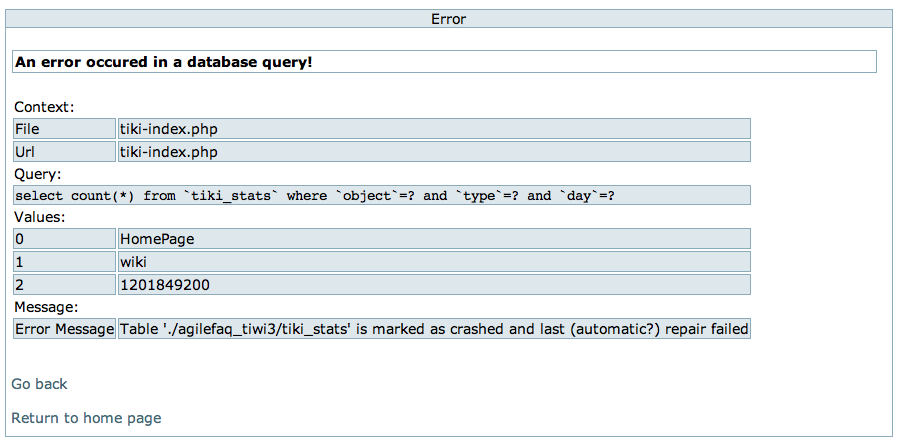
On googling about it, I found: “One common cause of this is the disk hitting 100%, so use df and du -sk / to try and figure out where your clogs are.” In my case, I’m pretty sure that I have enough disk space. I’m still not sure what caused this. But I found a work around to solve the problem at hand. If any one has ideas about this, I was be eager to hear about it.
Solution: execute the following command:
mysqlcheck –auto-repair -u{username} -p{password} {database_name} {database_table_name}
Posted in Database | No Comments »
Wednesday, March 23rd, 2005
Three types of concurrency control:
Pessimistic concurrency control: a record is unavailable to users while somebody else is accessing it. i.e. from the time the record is fetched until it is updated in the database. The way this is implemented is, the moment someone fetches a record, a lock is acquired on that table and no other user is allowed to access the same table until the lock is released.
Optimistic concurrency control: a record is unavailable to other users only while the data is actually being updated. The way this is implemented is, the update examines the record in the database and determines whether any changes have been made. Attempting to update a changed record results in a concurrency violation and hence an exception.
Last in Wins: a record is never unavailable to the users. Every time the user updates the record is simply saved without checking for updates on the record. This can potentially overwrite any changes made by other users since you last refreshed the records. This is the easiest to implement and the most dangerous to use.
Implementation details:
Pessimistic concurrency control (PCC):
It can be implemented with or without using database locks. It‘s usually implemented on the application side. Database locks are available in very limited DBMS and hence it‘s a good idea not to use database locks.
Most of the applications today have a multi-layered architecture and have a separate layer for database access. PCC is mostly implemented in the data access layer or the service layer. We can maintain a static list of tables, which are currently been accessed. Before processing any request for a record, we check in this list. If the table is present in the list, then we throw an exception, else add it to the table and fetch the data. There is an alternative to the static table. One can use lock-bits at the table record level and maintain them in a session pool.
The static list or the lock-bits can be cleared when the user leaves the page under program control. This is done to free the locks as soon as possible, but there is no guarantee that this will occur.
As the user can leave the browser or the site at any moment, we have to clear the list or lock-bits stored are the session pool on Session End. And as a final countermeasure, we might have a demon running on the server cleaning old locks.
We have to keep in mind that an application that holds locks for long periods is not scalable.
Last in Wins
This concurrency control can be implemented without having to do anything. This is the default behavior. But this might be unacceptable in some circumstances if different users start to access the same records frequently.
Optimistic concurrency control (OCC)
In OCC, several users can access a screen for the same record, but only the first one to save it will succeed. The rest would get concurrent change exception.
OCC is implemented based on the record version. The record version could mean all the columns of the record or a unique state code. For the unique code purpose we can use a GUID string or a date-time value. I‘m not too sure which one to use. But these are some points:
The GUID is not portable if we want to port the code to other platforms.
The GUID uses 40 bytes of binary data instead of the 8 bytes used by the date.
The date-time tells us when the record was last updated.
Example:
User A fetches a record from the database along with its version, more on this later.
User B fetches the same record from the database, also with its version and writes the updated record back to the database, updating the version number.
User A “tries” to write the record to the database, but as the version on the database is different from the version hold by user A, the write fails, leaving user B‘s changes intact.
It‘s always favorable to use OCC. But there might be situations where we have a long transaction, which spans over several screens. The user might not want to get concurrent change exception at the end of the updation. In these cases, it‘s better to use PCC and let the user know upfront about any possible locks.
Posted in Database | No Comments »
Monday, January 17th, 2005
Requirement: You have a portal which display a huge amount of data stored in the database. The web page essentially looks like an ancient VB app with all the winform kind of a look. The user wants to page the data that is retrieved from the database. Also at…
Posted in Database | No Comments »
Friday, January 14th, 2005
Recently I had a situation where I had to create a ‘Global Temp Table‘ inside a ‘T-SQL Stored Procedure‘. Though I was deleting the temp table at the end of the stored proc, there were some issues. The temp table was not deleted if…
Posted in Database | No Comments »
|