`
| |
|
Archive for the ‘Continuous Deployment’ Category
Sunday, April 17th, 2011
Better productivity and collaboration via
improved feedback and high-quality information.
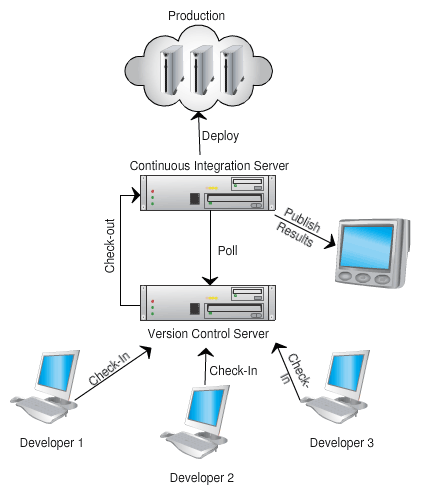
- Encourages an Evolutionary Design and Continuous Improvement culture
- On complex projects, forces a nicely decoupled design such that each modules can be independently tested. Also ensures that in production you can support different versions of each module.
- Team takes shared ownership of their development and build process
- The source control trunk is in an always-working-state (avoid multiple branch issues)
- No developer is blocked because they can’t get stable code
- Developers break down work into small end-to-end, testable slices and checks-in multiple times a day
- Developers are up-to date with other developer changes
- Team catches issues at the source and avoids last minute integration nightmares
- Developers get rapid feedback once they check-in their code
- Builds are optimized and parallelized for speed
- Builds are incremental in nature (not big bang over-night builds)
- Builds run all the automated tests (may be staged) to give realistic feedback
- Captures and visualizes build results and logs very effectively
- Display various source code quality metrics trends
- Code coverage, cyclomatic complexity, coding convention violation, version control activity, bug counts, etc.
- Influence the right behavior in the team by acting as Information Radiator in the team area
- Provide clear visual feedback about the build status
- Developers ask for an easy way to run and debug builds locally (or remotely)
- Broken builds are rare. However broken builds are rapidly fixed by developers
- Build results are intelligently archived
- Easy navigation between various build versions
- Easily visualization and comparison of the change sets
- Large monolithic builds are broken into smaller, self contained builds with a clear build promotion process
- Complete traceability exists
- Version Control, Project & Requirements Managements tool, Bug Tracking and Build system are completely integrated.
- CI page becomes the project dashboard for everyone (devs, testers, managers, etc.).
Any other impact you think is worth highlighting?
Posted in Agile, Continuous Deployment, Metrics, Organizational | No Comments »
Sunday, March 6th, 2011
Recently TV tweeted saying:
Is “measure twice, cut once” an #agile value? Why shouldn’t it be – it is more fundamental than agile.
To which I responded saying:
“measure twice, cut once” makes sense when cost of a mistake & rework is huge. In software that’s not the case if done in small, safe steps. A feedback centric method like #agile can help reduce the cost of rework. Helping you #FailFast and create opportunities for #SafeFailExperiements. (Extremely important for innovation.)
To step back a little, the proverb “measure twice and cut once” in carpentry literally mean:
“One should double-check one’s measurements for accuracy before cutting a piece of wood; otherwise it may be necessary to cut again, wasting time and material.”
Speaking more figuratively it means “Plan and prepare in a careful, thorough manner before taking action.”
Unfortunately many software teams literally take this advice as
“Let’s spend a few solid months carefully planning, estimating and designing software upfront, so we can avoid rework and last minute surprise.”
However after doing all that, they realize it was not worth it. Best case they delivered something useful to end users with about 40% rework. Worst case they never delivered or delivered something buggy that does not meet user’s needs. But what about the opportunity cost?
Why does this happen?
Humphrey’s law says: “Users will not know exactly what they want until they see it (may be not even then).”
So how can we plan (measure twice) when its not clear what exactly our users want (even if we can pretend that we understand our user’s needs)?
How can we plan for uncertainty?
IMHO you can’t plan for uncertainty. You respond to uncertainty by inspecting and adapting. You learn by deliberately conducting many safe-fail experiments.
What is Safe-Fail Experimentation?
Safe-fail experimentation is a learning and problem solving technique which emphasizes on conducting many simultaneous, small, controlled experiments with small variations. Since these are small controlled experiments, failure is an expected & acceptable outcome.
In the software world, spiking, low-fi-prototypes, set-based design, continuous deployment, A/B Testing, etc. are all forms of safe-fail experiments.
Generally we like to start with something really small (but end-to-end) and rapidly build on it using user feedback and personal experience. Embracing Simplicity (“maximizing the amount of work not done”) is critical as well. You frequently cut small pieces, integrate the whole and see if its aligned with user’s needs. If not, the cost of rework is very small. Embrace small #SafeFail experiments to really innovate.
Or as Kerry says:
“Perhaps the fundamental point is that in software development the best way of measuring is to cut.”
Also strongly recommend you read the Basic principles of safe-fail experimentation.
Posted in Agile, Continuous Deployment, Planning | No Comments »
Sunday, January 30th, 2011
How good are you at limiting red time? .i.e. apply limiting WIP (Work-In-Progress) concept to Programming and Product Development.
What is Red Time?
- During Test Driven Development and Refactoring, time taken to fix compilation errors and/or failing tests.
- While Programming, time taken to get the logic right for a sub-set of the problem.
- While Deploying, downtime experienced by users
- While Integrating, time spent fixing broken builds
- While Planning and Designing, time spent before the user can use the first mini-version of the product
- And so on…
Basically time spent outside the safe, manageable state.
Let it be planning, programming or deploying, a growing group of practitioners have learned how to effectively reduce red time.
For example, there are many:
- Refactoring Strategies which can help you reduce your red time by keeping you in a state where you can take really safe steps to ensure the tests are always running.
- Zero-Downtime Deployment which helps you deploy new versions of the product without your customers experiencing any downtime.
- Continuous Deployment which helps you get a change made to code straight to your customers as efficiently as possible
- Lean Start-up techniques which helps validate business hypothesis in a safe, rapid and lean manner.
- And so on…
I highly recommend watching Joshua Kerievsky’s video on Limited Red Society to gain his insights.
Over the years we’ve realized that it always helps to have simple tools to visualize your red time. Visualization helps you understand what’s happening better. And that helps in proactively finding ways to minimize red time.
At Industrial Logic we have a new product called Sessions which helps you visualize your programming session. It highlights your red time.
Posted in Agile, Continuous Deployment, Lean Startup, post modern agile, Product Development, Programming | No Comments »
Sunday, August 15th, 2010
You’ve heard about limiting WIP (Work-In-Progress) but how good are you at limiting red time? Red time is when you have compilation errors and/or failing tests. A growing group of practitioners have learned how to effectively reduce red time while test-driving and refactoring code. To understand how to limit red time, it helps to visualize it.
In this talk, I demonstrated various strategies to limit your time in Red. We also analyzed a live programming sessions using graphs that clearly visualize red time. Participants learned what development processes help or hurt our ability to limit red time and gained an appreciation for the visual cues that can help make you a better developers and fellow member of the Limited Red Society.
Slides from the Presentation:
Posted in Agile, agile india, Continuous Deployment, post modern agile, Programming | No Comments »
Tuesday, November 24th, 2009
Lets assume you have a simple web application which runs on a web server like tomcat, jetty, IIS or mongrel and is backed by a database. Also lets say you have only one instance of your application running (non-clustered) in production.
Now you want to deploy your application several times a week. The single biggest issue that gets in the way of continuous deployment is, every time you deploy a new version of your application, you don’t want a downtime (destroy your user’s session). In this blog, I’ll describe how to deploy your applications without interrupting the user.
First time set-up steps:
- On your local machine set up a web server cluster for session replication and ensure your application works fine in a clustered environment. (Tips on setting up a tomcat cluster of session replication). You might want to look at all the objects you are storing in you session and whether they are serializable or not.
- On your production server, set up another web server instance. We’ll call this temp_webserver. Make sure the temp_webserver runs on a different port than your production server. (In tomcat update the ports in the tomcat/config/server.xml file). Also for now, don’t enable clustering yet.
- In your browser access the temp_webserver (different port) and make sure everything is working as expected. Usually both the port on which the production web server and the temp_webserver is running should be blocked and not accessible directly from any other machine. In such cases, set up an SSH-tunnel on the specified port to access the webapp in your browser. (ssh -L 3333:your.domain.com:web_server_port username@server_ip_or_name). Alternatively you could SSH to the production box and use Lynx (text browser) to test your webapp.
- Now enable clustering on both web servers, start them and make sure the session is replicated. To test session replication, bring up one webserver instance, login, then bring up the other instance, now bring down the first instance and make sure your app does not prompt you to login again. Wait a sec! When you brought down the first server, you get a 404 Page not found. Of course, even though clustering might be working fine, your browser has no way to know about the other instance of web server, which is running on a different port. It expects a webserver on the production server’s port.
- To solve this problem, we’ll have to set up a reverse-proxy server like Nginx on your production box or any of your other publically accessible server. You will have to configure the reverse proxy server to run on the port on which your web server was running and change your webserver to run on a different (more secure) port. The reverse proxy server will listen on the required port and proxy all web requests to your server. (sample Nginx Configuration). This will help us start and stop one of our webservers without the user noticing it. Also notice that its a good practice to let your reverse proxy server serve all static content. Its usually a magnitude faster.
- After setting up a round robin reverse proxy, you should be able to test your application in a clustered environment.
- Once you know your webapp works fine in a clustered env in production, you can change the reverse-proxy configuration to direct all traffic to just your actual production webserver. You can comment out the temp_webserver line to ensure only production webserver is getting all requests. (Every time you make a change to your reverse proxy setting, you’ll have to reload the configuration or restart the reverse proxy server. Which usually takes a fraction of a second.)
- Now un-deploy the application on the temp_webserver and stop the temp_webserver. Everything should continue working as before.
- * At each step of this process, its handy to run a battery of functional tests (Selenium or Sahi) to make sure that your application is actually work the way you expect it. Manual testing is not sustainable and scalable.
This concludes our initial set-up. We have enabled ourselves to do continuous deployment without interrupting the user.
Note: Even though our web-server is clustered for session replication, we are still using the same database on both instances.
Now lets see what steps we need to take when we want to deploy a new version of our application.
- FTP the latest web app archive (war) to the production server.
- If you have made any Database changes follow Owen’s advice on Zero-Downtime Database Deployment. This will help you upgrade the DB without affecting the existing, running production app.
- Next bring up the temp_webserver and deploy the latest web application. In most cases, its just a matter of dropping the web archive in the web apps folder.
- Set up a SSH-Proxy from your machine to access the temp_webserver. Run all your smoke tests to make sure the new version of the web-app works fine.
- Go back into your reverse proxy configuration and comment out the production webserver line and uncomment the temp_webserver line. Reload/Restart your reverse proxy, now all request should be redirected to temp_webserver. Since your reverse proxy does not hold any state, reloading/restarting it should not make any difference. Also since your sessions are replicated in the cluster, users should see no difference, except that now they are working on the latest version of your web app.
- Now undeploy the old version and deploy the latest version of your web app on the production webserver. Bring it up and test it using a SSH_proxy from your local machine.
- Once you know the production web-server is up and running on the latest version of your app, comment out the temp_webserver and uncomment the production webserver in the reverse proxy setting . Reload the configuration or restart the reverse proxy. Now all traffic should get redirected to your production web server.
- At this point the temp_webserver has done its job. Its time to undeploy the application and stop the temp_webserver.
Congrats, you have just upgraded your web application to the latest version without interrupting your users.
Note: All the above steps are very trivial to automate using a script. Because of the speed and accuracy, I would bet all my money on the automated script.
Posted in Continuous Deployment, Deployment, Tips | 1 Comment »
Wednesday, January 14th, 2009
Have you come across developers who think that having a separate Quality Assurance (QA) team, who could test (manually or auto-magically) their code/software at the end of an iteration/release, will really help them? Personally I think this style of software development is not just dangerous but also harmful to the developers’ growth.
Having a QA Team that tests (inspects) the software after it’s built, gives me an impression that you can slap inspection at the end of any process and improve the quality of your product. Unfortunately things don’t work this way. What you want to do is build quality into the process rather than inspecting (checking) at the end of your process to assure quality.
Let me give you an example of what I mean by “building quality into the process“.
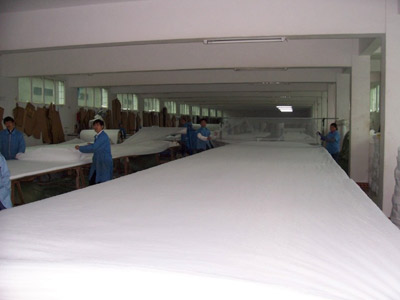
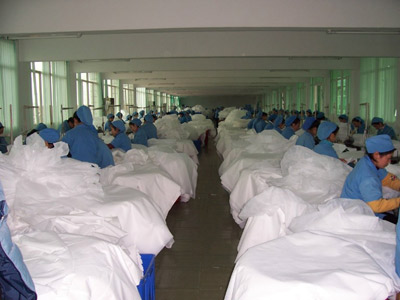
Back in the good old days, it was typical for a cloth manufacturer to have 10-15 power looms. They would set up these looms at the beginning of the day and let them run for the day. At the end of the day, they would take all the cloth produced by the looms and hand it over to another team (separate QA team) who would check each cloth for defect.
There were multiple sources of defects. At times one of the threads would break creating a defect in the cloth. At times insects would sit on the thread and would also get woven into the cloth creating a defect. And so on. Checking the cloth at the end of the day was turning out to be very expensive for the cloth manufactures. Basically they were trying to create quality products by inspecting the cloth at the end of the process. This is similar to the QA process in a waterfall project.
Since this was not working out, they hired a lot of people to watch each loom. Best case, there would be one person per loom watching for defects. As soon as a thread would break, they would stop the loom, fix the thread and continue. This certainly helped to reduce the defects, but was not an optimal solution for several reasons:
- It was turning out to be quite expensive to have one person per loom
- People at the looms would take breaks during the day and they would either stop the loom during their break (production hit) or would take the risk of letting some defects slip.
- It become very dependent on how closely these folks watched the loom. In other words, the quality of the cloth was very dependent on the capability of the person (good eyesight and keen attention) inspecting the loom.
- and so on
As you can see, what we are trying to do here is move the quality assurance process upstream. Trying to build quality into the manufacturing process. This is similar to the traditional Agile process where you have a couple of dedicated QAs on each team, who check for defects during or at the end of the iteration.
The next step which really helped fix this issue, to a great extent, was a ground breaking innovation by Toyoda Looms. As early as 1885 Sakichi Toyoda worked on improving looms.
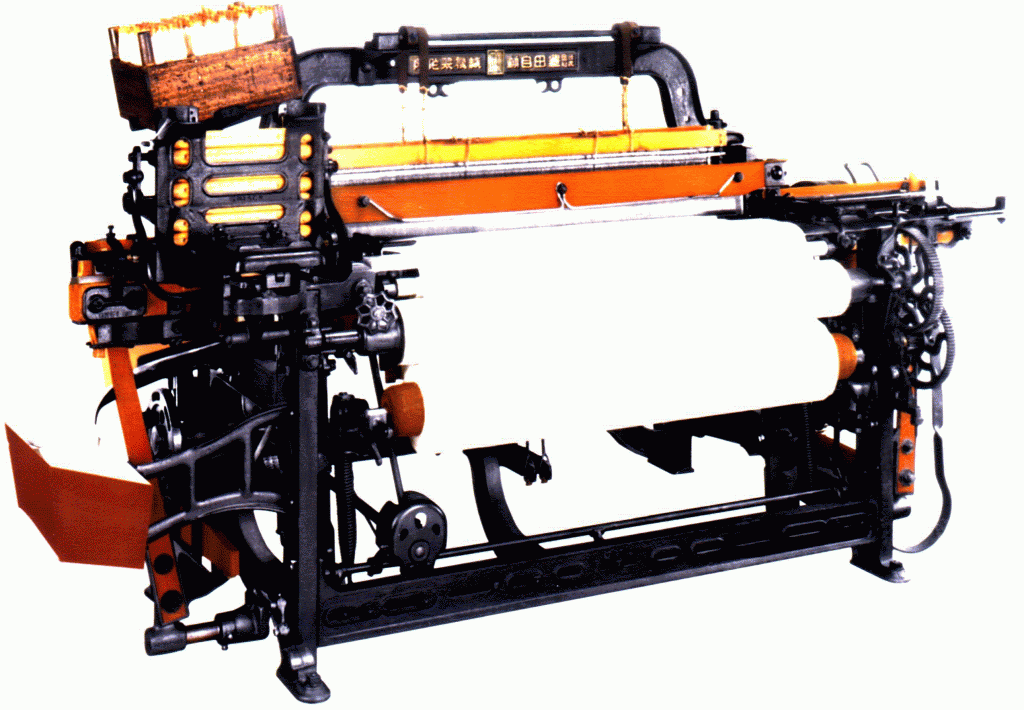
One of his initial innovation was to introduce a small lever on each thread. As soon as the thread would break, the lever would go and jam the loom. They went on to introduce noteworthy inventions such as automatic thread replenishment without any drop in the weaving speed, non-stop shuttle change motion, etc. Now a days, you can find looms with sensors which detect insect or other dirt on the threads and so on.
Basically what happened in the loom industry is they introduced various small mechanisms to be part of the loom which prevents the defect from being introduced in the first place. In other words, as and when they found issues with the process, they mistake proofed it by stopping it at source. They built quality into the process by shifting their focus from Quality Assurance to Quality Control. This is what you see in some really good product companies where they don’t really have a separate QA team. They focus on how can we eliminate/reduce the chances of introduction of defects rather than how can we detect defects (which is wasteful).
Hence its important that we focus on Quality Control rather than Quality Assurance. The terms “quality assurance” and “quality control” are often used interchangeably to refer to ways of ensuring the quality of a service or product. The terms, however, have different meanings.
Assurance: The act of giving confidence, the state of being certain or the act of making certain.
Quality assurance: The planned and systematic activities implemented in a quality system so that quality requirements for a product or service will be fulfilled.
Control: An evaluation to indicate needed corrective responses; the act of guiding a process in which variability is attributable to a constant system of chance causes.
Quality control: The observation techniques and activities used to fulfill requirements for quality.
So think about it, do you really need a separate QA team? What are you doing on the lines of Quality Control?
IMHO, in the late 90’s eXtreme Programming really pushed the envelope on this front. With wonderful practices like Automated Acceptance Testing, Test Driven Development, Pair Programming and Continuous Integration, I finally think we are getting closer. Having continuous/frequent working sessions with your customers/users is another great way of building quality into the process.
Lean Startup practices like Continuous Deployment and A/B Testing take this one step further and are really effective in tightening the feedback cycle for measuring user behavior in real context.
As more and more companies are embracing these methods, its becoming clear that we can do away with the concept of a separate QA team or an independent testing team.
Richard Sharpe made a great interview of Jean Tabaka and Bob Martin on the lean concept of “ceasing inspections”. In this 7 minute video, Jean and Bob support the idea of preventing defects upfront rather than at the end. Quality Assurance vs Quality Control
Posted in Agile, Continuous Deployment, Lean Startup, Testing | 31 Comments »
Wednesday, June 21st, 2006
What is the purpose of Continuous Integration (CI)?
To avoid last minute integration surprises. CI tries to break the integration process into small, frequent steps to avoid big bang integration as it leads to integration nightmare.
If people are afraid to check-in frequently, your Continuous Integration process is not working.
CI process goes hand in hand with Collective Code Ownership and Single-Team attitude.
CI is the manifestation of “Stop the Line” culture from Lean Manufacturing.
What are the advantages of Continuous Integration?
- Helps to improve the quality of the software and reduce the risk by giving quicker feedback.
- Experience shows that a huge number of bugs are introduced during the last-minute code integration under panic conditions.
- Brings the team together. Helps to build collaborative teams.
- Gives a level of confidence to checkin code more frequently that was once not there.
- Helps to maintain the latest version of the code base in always shippable state. (for testing, demo, or release purposes)
- Encourages lose coupling and evolutionary design.
- Increase visibility and acts as an information radiator for the team.
- By integrating frequently, it helps us avoid huge integration effort in the end.
- Helps you visualize various trends about your source code. Can be a great starting point to improve your development process.
Is Continuous Integration the same as Continuous build?
No, continuous build only checks if the code compiles and links correctly. Continuous Integration goes beyond just compiling.
- It executes a battery of unit and functional tests to verify that the latest version of the source code is still functional.
- It runs a collection of source code analysis tools to give you feedback about the Quality of the source code.
- It executes you packing script to make sure, the application can be packaged and installed.
Of course, both CI and CB should:
- track changes,
- archive and visualize build results and
- intelligently publish/notify the results to the team.
How do you differentiate between Frequent Versus Continuous Integration?
Continuous means:
- As soon as there is something new to build, its built automatically. You want to fail-fast and get this feedback as rapidly as possible.
- When it stops becoming an event (ceremony) and becomes a behavior (habit).
Merge a little at a time to avoid the big cost at full integration at the end of a project. The bottom line is fail-fast & quicker feedback.
Can Continuous Integration be manual?
Manual Continuous Integration is the practice of frequently integrating with other team members’ code manually on developer’s machine or an independent machine.
Because people are not good at being consistent and cannot do repetitive tasks (its a machine’s job), IMHO, this process should be automated so that you are compiling, testing, inspecting and responding to feedback.
What are the Pre-Requisites for Continuous Integration?
This is a grey area. Here a quick list is:
- Common source code repository
- Source Control Management tool
- Automated Build scripts
- Automated tests
- Feedback mechanism
- Commit code frequently
- Change of developer mentality, .i.e. desire to get rapid feedback and increase visibility.
What are the various steps in the Continuous Integration build?
- pulling the source from the SCM
- generating source (if you are using code generation)
- compiling source
- executing unit tests
- run static code analysis tools – project size, coding convention violation checker, dependency analysis, cyclomatic complexity, etc.
- generate version control usage trends
- generate documentation
- setup the environment (pre build)
- set up third party dependency. Example: run database migration scripts
- packaging
- deployment
- run various regression tests: smoke, integration, functional and performance test
- run dynamic code analysis tools – code coverage, dead-code analyzer,
- create and test installer
- restore the environment (post build)
- publishing build artifact
- report/publish status of the build
- update historical record of the build
- build metrics – timings
- gather auditing information (i.e. why, who)
- labeling the repository
- trigger dependent builds
Who are the stakeholders of the Continuous Integration build?
- Developers
- Testers [QA]
- Analysts/Subject Matter Experts
- Managers
- System Operations
- Architects
- DBAs
- UX Team
- Agile/CI Coach
What is the scope of QA?
They help the team with automating the functional tests. They pick up the product from the nightly build and do other types of testing.
For Ex: Exploratory testing, Mutation testing, Some System tests which are hard to automate.
What are the different types of builds that make Continuous Integration and what are they based on?
We break down the CI build into different builds depending on their scope & time of feedback cycle and the target audience.
1. Local Developer build :
1.a. Job: Retains the environment. Only compiles and tests locally changed code (incremental).
1.b. Feedback: less than 5 mins.
1.c. Stakeholders: Developer pair who runs the build
1.d. Frequency: Before checking in code
1.e. Where: On developer workstation/laptop
2. Smoke build :
2.a. Job: Compiles , Unit test , Automated acceptance and Smoke tests on a clean environment[including database].
2.b. Feedback: less than 10 to 15 mins. (If it takes longer, then you could make the build incremental, not start on a clean environment)
2.c. Stakeholders: All the developers within a single team.
2.d. Frequency: With every checkin
2.e. Where: On a team’s dedicated continuous integration server. [Multiple modules can share the server, if they have parallel builds]
3. Functional build :
3.a. Job: Compiles , Unit test , Automated acceptance and All Functional\Regression tests on a clean environment. Stubs/Mocks out other modules or systems.
3.b. Feedback: less than 1 hour.
3.c. Stakeholders: Developers , QA , Analysts in a given team
3.d. Frequency: Every 2 to 3 hours
3.e. Where: On a team’s dedicated continuous integration server.
4. Cross module build :
4.a. Job: If your project has multiple teams, each working on a separate module, this build integrates those modules and runs the functional build across all those modules.
4.b. Feedback: in less than 4 hr.
4.c. Stakeholders: Developers , QA , Architects , Manager , Analyst across the module team
4.d. Frequency: 2 to 3 times a day
4.e. Where: On a continuous integration server owned by all the modules. [Different from above]
5. Product build :
5.a. Job: Integrates all the code that is required to create a single product. Nothing is mocked or stubbed. [Except things that are not yet built]. Creates all the artifacts and publishes a deployable product.
5.b. Feedback: less than 10 hrs.
5.c. Stakeholders: Every one including the Project Management.
5.d. Frequency: Every night.
5.e. Where: On a continuous integration server owned by all the modules. [Same as above]
General Rule of Thumb: No silver bullet. Adapt your own process/practice.
Posted in Agile, Continuous Deployment, Learning, Metrics, Organizational | No Comments »
|